Home Blog Page 11

What is CRM?

0
why invest in CRM systems (Customer Relationship Management)
CRM (Customer Relationship Management)

CRM is much more than an acronym that’s been tossed around the business and sales world for the past decade or so.

With a CRM application, there’s no secret formula. It simply organizes the majority of your key client information so that you can access it all in one location.

You may examine contact information, follow up through email or social media, manage projects, and track your business success.

Implementing the correct CRM system helps boost sales efficiency.

You can close more deals, boost sales, and improve forecast accuracy.

C-R-M stands for Customer Relationship Management

What is CRM?

CRM is the process through which a company or organization communicates with a customer or potential customer in order to manage and build a relationship.
What is CRM
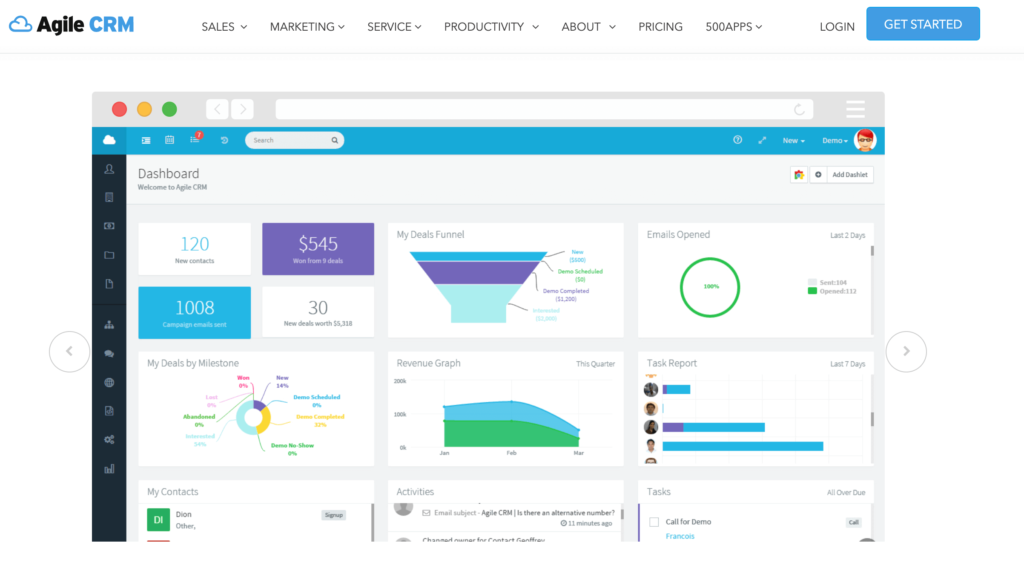
What is CRM? A glimpse of Agile CRM

Who Benefits From a CRM System?

7 Industries That Use CRM the Most

  1. Retail Industry
  2. Banking
  3. Hotels
  4. Financial Services
  5. Insurance
  6. Consulting
  7. Agriculture

When should use a CRM system?

  1. There’s no single source for information

    Keeping client and order information in many places, such as a spreadsheet or sticky notes on your computer, disadvantages your sales staff.
  2. There’s little or no visibility

    You don’t just lack visibility into how your consumers interact with your staff; you also lack insight into what your salespeople are doing. This makes it harder to assist them in succeeding — and to hold them accountable.
  3. Reports are hard to create and share

    It would be wonderful to generate reports and statistics on your sales team’s monthly progress versus their quota. However, manually compiling reports is time-consuming and sometimes results in no tracking at all.
  4. All customers are given the same priority

    The worth of interested parties to the firm is not separated. Instead, regardless of the stage of the buying process, they are in or which sector or location they are in, all customers and prospects receive the same offers and information.
  5. You don’t have a plan to support your business growth

    Don’t worry if you know your business will develop and you’re anxious about keeping up. This is exactly the kind of problem that a CRM system can solve.

Why CRM is The Best Option For You?

Know Your Customers… and Potential Customers

Built a Personalized Relationship With Your Customers

See What Can’t Be Seen

Automate the stuff

Related Questions

Does CRM require a large IT investment?

No. There is no shortage of cloud CRM systems designed for IT novices. You don’t need to invest heavily in physical IT equipment or pay IT professionals to run your CRM. Many CRM systems are offered as SaaS, which means you only pay for what you need and may stop using it at any moment.

Are CRMs expensive?

There are several CRMs on the market, each with its own cost and feature set. There are CRMs that may be utilized for free, depending on your needs. Enterprise-level solutions, on the other hand, can cost thousands of dollars every month. Finally, there is a CRM to suit almost any business size and budget.

My business is very small. Do I need a CRM Solution?

A CRM solution is appropriate for any size organization. Even if you have a small number of customers presently, a CRM may help you locate and reach out to new ones more efficiently.

Which are the Top CRM systems?

There are many CRM systems in the market at the moment such as Salesforce, Odoo. For the best CRM systems check out Top 10 Cloud Based CRM Software.

Conclusion

CRM is a wonderful tool for businesses to boost not just customer happiness but also efficiency and revenues. CRM is available in a wide range of tactics and applications, allowing it to be tailored to practically any business type.

CRM software may assist almost every firm, and it is far preferable to begin utilizing one before it becomes required.

When deciding which CRM solution to utilize, businesses must examine their operations and sales process:

What client data is important to your sales process?

How frequently do you contact a customer before they make a purchase?

As a business owner considering a CRM system could be the catalyst, your business needs at the moment.
How to Create Trello Cards and Perform Trello Hubspot Integration in 3 Simple Steps

0

Often, the greatest challenge marketers face when working isn’t the actual work. Instead, the other related tasks — brainstorming, scheduling, and coordinating moving parts — wind up causing us stress, and we think about having a helping hand with us. This is where tools like Trello come in, and with that comes the creation of Trello cards.

We’ve talked about Trello before, but today we have come up with Trello and HubSpot integration.

Before directly jumping on to the integration, first, we must understand the basics of Trello.

What is Trello Card?

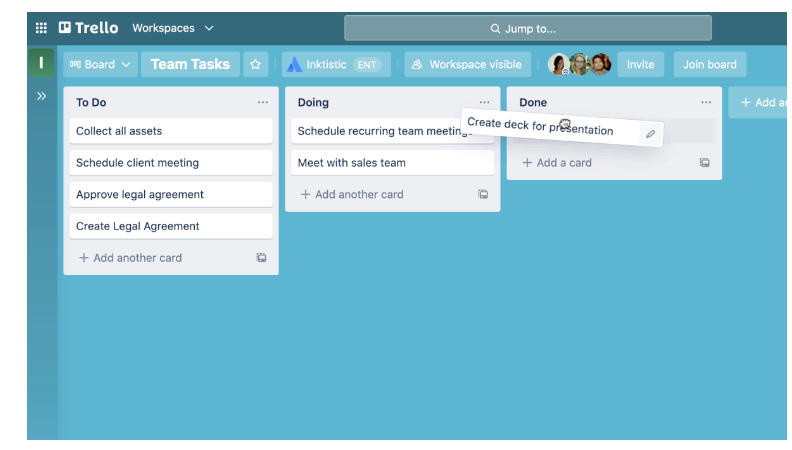
A card (C) is the smallest but most detailed unit of a board is a card (C). Cards are used to represent tasks and ideas. A card can be something that needs to get done, like a blog post to be written or something that needs to be remembered, like company vacation policies.

Cards can be customized to hold a wide variety of helpful information by clicking on the—drag and drop cards across lists to show progress. There’s no limit to the number of cards you can add to a board.

create trello cards
Depiction of Trello card

How to Use Trello Cards?

There are different ways how to use Trello cards.

  • 1. To Add tasks and to-dos

As a fundamental unit of a board, cards are used to represent tasks and ideas. It can be used for something that needs to get done, like a customer support issue, a new design, a blog post, or something project-related that you need to be reminded of.

Cards can be customized to hold a wide variety of helpful information by clicking on them—drag and drop cards across lists to show progress. There’s no limit to the number of cards you can add to a board.

  • Add cards for each task that needs to be completed by clicking “Add A Card” in the first list. Keep card titles short of making it easier to scan and see the status of each card on the board.
  • 2. Get Specific On The Card Back

As mentioned earlier, you can click on a card to expand it and add and access more details. This is the “card back”, where you can get more specific with your information.

How to use Trello Cards with Hubspot Workflow (Trello Hubspot Integration)?

Before creating Trello cards with workflows, you’ll need to connect Trello to your HubSpot account. You can connect the app from the App Marketplace or within a workflow.

Step 1: Create Trello cards with a workflow:

  • In your HubSpot account, navigate to Automation > Workflows.
  • Click the name of an existing workflow, or create a new workflow.
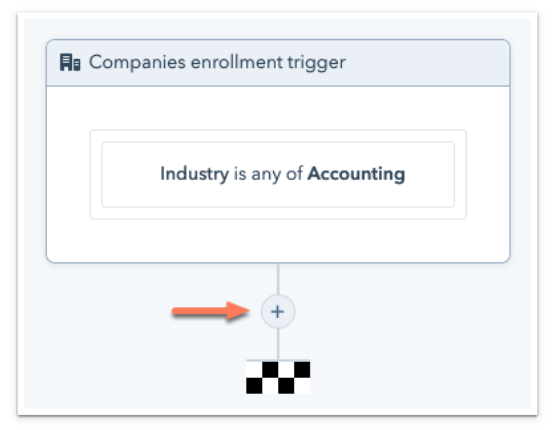
  • Click the + plus icon to add a workflow action
trello hubspot integration
Click the “+” icon to create the workflow

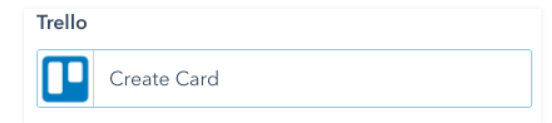
Step 2: Select Create Card

trello cards
Create a card option in Trello

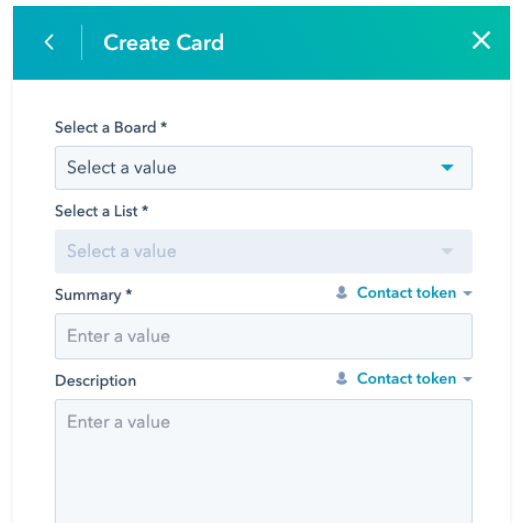
Step 3: Set up your card details

  1. Select a Board: select the board to which you want to add the card.
  2. Select a List: select the list to which you want to add the card.
  3. Summary: enter an outline for the card. To add record-specific details to the Trello card, use the Token dropdown menu to insert personalization tokens.
  4. Description: enter a report for the card if needed. To add record-specific details to the Trello card, use the Token dropdown menu to insert personalization tokens.
  5. Click Save.
create trello cards
Create and save card

Once records start going through the action, you can view the cards in Trello. If you’re not seeing cards being created in Trello, check the workflow history to consider any possible errors.

PRO TIP

Easily add cards to a board in bulk from a list or spreadsheet by copying the list and pasting it into a new Trello card. Trello will automatically turn each line-separated item into a new card, and you can kiss those old tools goodbye.

Conclusion

Trello is a simple and easy-to-use project management tool that has been helping many teams and individuals in their success journey, and Trello cards are a significant part of that journey. By following the above simple steps, you can keep everyone in your team on the same page that too with all of the information in one place. Isn’t that incredible!!!

Know More: What is HubSpot: How Hubspot is Building Pathways for Businesses to Succeed

11 Must-Have Features for your Enterprise CRM

1

There are a variety of enterprise CRM software options on the market for small businesses and perhaps it becomes very cumbersome to choose one. Make sure to check out our must-have enterprise CRM  features before making a commitment.

What is an Enterprise CRM?

Enterprise CRMs are designed for complex, larger businesses.  Good examples are Salesforce, Microsoft Dynamics, and SAP. They will be able to deal with many customer-facing departments, vast databases, and robust requirements. Enterprises tend to have multiple sales teams, all needing access to the same customer data. With so many people involved in the business processes, it makes sense for them to all use the same system.  This is where the enterprise CRM comes into its own. Allowing a great deal of automation, it may be more expensive but most of the cost will be involved in customizing the system and deploying it throughout every area of the enterprise.

11 Must-Have Features for your Enterprise CRM

1. Contact Management

Contact management, an element of CRM that sometimes goes by customer management software, is a vital CRM capability. It allows users to segment your contacts into groups to organize and better cater to them. With this CRM capability, you’ll be able to gather crucial customer data and bolster your marketing strategies when introducing new products. It also improves the personalization of all contacts with customers, making them feel important and catered to. This is a key factor in customer satisfaction!

 2. Lead management

Identify your best customers based upon psychographic/demographics, making the management of leads far more accurate. This deals with the process of converting prospects into leads by scoring and moving upwards through the pipeline. Sales employees need to be happy with how this works and the process needs to flow in a way that you would naturally use as a business. Look at your existing manual process and see how this fits.

3. Sales Analytics

Another important feature to look for during your search for an enterprise CRM is the use of sales analytics. By using this feature, your sales team can make future sales campaigns a lot more impactful by analysing any data from previous projects.

The enterprise CRM you pick with a sales analytics feature needs to be able to pull data from every corner so your team really enjoys the benefits, such as website traffic, social media and more.

Enterprise CRM
Sales analytics through CRM

4. Email integration

Integrate with email such as Gmail, Outlook, Yahoo, etc., allowing for management and segmentation of contact lists, as well as a centralized hub for internal cross-collaboration.

Key considerations: Think about how your team primarily communicates. If they’re not used to collaborating within an app, you may want to prioritize CRM software with email integration capabilities.

CRM Enterprise Software
Email Integration

5. Reports and Dashboards

Once relegated to business intelligence tools, BI, reporting and dashboards have become some of the top CRM features. Users can view statistics in a highly visual, engaging perspective using customized reports and dashboards. They offer real-time data updates and a platform that can be accessed from various portals, improving ease of access for a variety of personnel. Management can use these reports to make data-driven decisions — an investment in CRM BI is an investment in the future of your business.

6.  Sales automation

You need to be able to automate the sales process, taking control of outgoing calls and follow ups, and data organization for effective campaign planning. This frees up more employee time as many manual tasks will become part of the CRM automatic process. Repetitive tasks can be taken care of by creating workflow triggers for specific actions or the sending of reminders. This is often sold as an upgrade so when choosing your enterprise CRM software, think about the amount of repetitive tasks involved in current processes. Be sure that if these were automated, the benefits will outweigh the additional costs. Most of the time, this is definitely the case.

7. Document Management

Collect, upload, store, and share documents in a centralized location, making it easier for everyone involved to access information.

Key considerations: Document management is a great CRM feature if you have a large team involved in your marketing and sales funnel. A centralized hub for important documentation can go a long way toward ensuring all team members are in the know, and promotes a smooth, consistent experience for your customers.

8. Communication and collaboration tools

By leveraging the contact history of all your customers housed in the CRM, your business can deliver better client communication and follow-up.

This allows you to tailor customer outreach based on factors like whether or not this is the first interaction with a client or if the customer called previously with a complaint.

Instead of a one-size-fits-all message, your business can send an email customized to where the client lives in the customer life cycle.

Personalized messaging results in improved response rates, so this functionality is key to lifting performance of sales and marketing tactics such as lead nurturing.

Tools to facilitate customer communication are included in the best CRMs. For example, HubSpot allows you to send emails to clients and provides email templates to streamline this process.

CRM Enterprise Solutions
CRM helps in Team Collaboration

9. Template Library

Templates are pre-built content that helps you kickstart tasks like an email or blog post. Using the template library included in a CRM streamlines your work and accelerates task completion. And the templates are customizable to meet your specific needs.

Templates address a wide range of scenarios as well. Some CRMs can even become project management tools through the use of templates.

As a result, templates can not only accelerate task completion, but they can replace the need to purchase additional software.

10. Sales Forecasting

Provides far more accurate benchmarks with regard to sales, comparing actual results to forecasts.  This way you can see if your sales team are on target and use this valuable data to fine-tune future campaigns.  Future sales and revenue figures can be predicted by making use of historical and current data and trends.  This is an essential feature if you need the ability to create forecasts for months ahead or even proposed new geographical areas. This is a great way of making your data work hard, enabling you to make far better informed decisions about moving forward with the business. 

11. User Management

Finally, look for a user management feature in your enterprise CRM, like a hierarchical format that HubSpot offers. This is something that’s needed or at least recommended at an enterprise level because of so many users and international users coming into the equation.

This feature lets you organise your users on multiple levels based on the team they’re in, their region, business unit, product line or pretty much any other dimension you choose. By having this feature on hand, you can be more flexible in what you enable or disable for your users and only giving relevant access to the right people.

Conclusion

Today’s CRM applications contain a vast array of capabilities beyond those reviewed here. Some may prove essential to your business operations.

Therefore, to choose the right CRM for your company, start by examining your business needs. Then contrast those needs against the capabilities of the CRM to find a match. For instance, if the ability to manage advertising campaigns is important to your business, select a CRM that supports this, like Zoho.

Because CRM software is so extensive, the time spent researching options now will ensure you get the most out of your CRM investment.
To know more about CRMs Checkout Digitify CRM Page.

Employee Engagement Strategies for Better Workplace Environment

0

How engaged are your employees? If you don’t know the answer to that question, it’s high time you take a look at your employee engagement strategies. Having solutions in place for employees who are disengaged will help you improve retention, increase productivity, and ultimately take you business to the top of the pyramid.

“The more engaged they are, the better it is for the organization.”

What is Employee Engagement?

Employee engagement measures how enthusiastic and dedicated a worker is to their employer’s success. It is the emotional connection or commitment that an employee has to the organization that then causes the employee to want to put forth the additional effort to ensure the organization and the brand succeed.

Your employee engagement strategy should outline:

  • How you’ll measure engagement—whether via an employee engagement survey or lagging indicators like turnover, absenteeism, and productivity
  • Goals for improving those metrics
  • Your budget for engagement-related initiatives
  • Clear tactics for how you’ll improve engagement, which can include any of the tactics we get into next

Why are Employee Engagement Strategies Important?

  1. Better customer satisfaction
  2. Improved productivity and efficiency
  3. Reduction of staff turnover
  4. Lowered absenteeism
  5. Enhanced company culture
  6. Better business outcomes
  7. Decrease number of safety incidents

Top Leadership Best Practices That Improve Employee Engagement

1. Conduct an employee engagement survey

Before you can work on improving employee engagement, you need to know where your baseline is. That’s where an employee engagement survey comes in. There are several different ways you can structure the employee engagement survey, including:

  • Rating statements on a scale
  • Open-ended questions
  • Multiple-choice questions

The questions in an employee engagement survey should address the everyday experiences of employees, how they interact with management, and the overall company mission. It’s important that employees be able to respond anonymously so they provide honest feedback. 

employee engagement survey
Make engagement surveys for employees

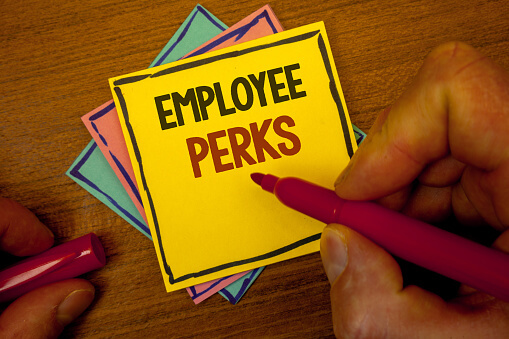
2. Provide Extra Employee Perks and Privileges

As competition for top talent has skyrocketed over the last decade, extra little perks and privileges have sprung up.  Some popular perks include:

  • Gym memberships
  • Commuter benefits
  • Continuing education coverage
  • Home office stipends
  • Equity packages

Many of these are table stakes for talented, engaged employees today. Researchers said,

“Having these kinds of extras can keep them sane, improving their mental health, thus keeping them engaged. Employees need something to help them de-stress, and these activities will help them rejuvenate their energy in preparation for another work week.”

enhance employee engagement

3. Think holistically

Given how much time is spent at work, it’s no surprise that employees want their workplace to be a pleasant one. This covers everything from the space in which they work to the small perks like coffee and snacks. Changing the environment to better suit your employees shows them that you value their comfort.

4. Recognize Good Work

Two out of three employees feel they do not get enough recognition for their work. As a result, most employees will not deliver their maximum potential and may engage in unwanted behaviour. Also, highly-trained and qualified talent is always looking for better options out there.

For this reason, it is wise to create a recognition-rich environment where good work is rewarded with perks and incentives

5. Focus on diversity and inclusion for better engagement

The more diverse your team is in regards to age, gender, race, and ethnicity, the better they perform. Gartner Research found a 12 percent boost in performance among diverse teams, with a similar improvement in intent to stay at a job. Plus, having a team with different backgrounds and experiences discourages groupthink and is likely a more accurate representation of your customer base. 

enhance employee engagement
Employee Diversity and Inclusion leads to higher retention rate.

6. Make Employee Well-Being a Priority

With ever-connected devices, newly crowned home ‘offices’, and much of social life on hold for the past year, overwork and burnout are at an all-time high for many employees. And that’s no recipe for engagement. Providing resources or activities to deal with high-stress situations through team-based activities like a softball league or offering gym memberships helps show empathy for your employees and care for their overall wellness.

7. Boost engagement with better work-life balance

Maintaining work-life balance helps employees reduce stress and prevent burnout, two major factors in disengagement at work. The best way to help employees maintain a balance between the personal and professional is to promote flexibility. 

Allowing employees to work from home, having a generous PTO policy, and providing paid parental and caregiver leave are all ways to help employees manage the demands of work and life without stress. Flexibility may come at a cost to employers but so does replacing dissatisfied employees. 

enhance employee engagement
Providing employees with work life balance leads to better productivity.

8. Sketch a Success Roadmap

This applies most if you hire millennials in your organization. For many millennials, just coming to the office, doing the work assigned, and taking the paycheck back home is not enough. They are more conscious about where they will stand in the next five or ten years. They need to know there are sufficient growth prospects for the role they are fulfilling.

Sketching a proper roadmap of success is yet another pillar to a successful employee engagement strategy.

employee engagement strategies

9. Increase transparency

It’s no good to work behind the scenes to increase engagement, employees should be updated often about what their leadership is up to.

Using strategies like all-organization meetings, weekly team updates and newsletters, an organization can let employees know that they are taking employee well-being seriously, and are working to make the organization a better place.

Employees will become more engaged simply by knowing that their leadership values them and is working to make the organization a better place.

10.  Show employees that you listen

If you want truly engaged employees, your organization has to make the action a priority.

If there are complaints, there should also be solutions proposed and acted upon by the organization.

If employees feel like their complaints, suggestions and thoughts on improvement fall upon deaf ears, they will quickly stop trying to engage.

employee engagement

Conclusion

Keeping employees engaged means making them feel as though they are a valued member not just of a company but of a community. The more opportunity your staff has to engage in meaningful interactions and tasks in an environment that fosters creativity, inspiration, and collaboration, the more dedicated they’ll be to your company’s mission and ongoing success.

Checkout our blog on Microsoft Teams App for Better Team Engagement.

How to Build an Instagram Sales Funnel in 4 Easy Steps

0

We all know the power of Instagram marketing. It’s a fun and interactive way to generate leads, increase Instagram sales, and generate buzz for your business. However, many people don’t know that there’s a new way to create Instagram sales funnels entirely inside of your Instagram page!

But firstly let us clarify what is a Sales Funnel……

What is Instagram sales funnel?

A Instagram sales funnel describes the steps Instagram followers take on the way to becoming your customers. It consists of five phases:

  1. Awareness – Attracting new people who are currently unaware of your brand.
  2. Consideration – Standing out among your competition so that new audience members remember you.
  3. Action – Compelling your audience to take action and make a purchase.
  4. Engagement – Using social media to stay top-of-mind and keep your audience engaged after they’ve purchased.
  5. Advocacy – Building enough trust with your audience that they want to recommend you to others.

What is the Importance of Instagram Sales Funnel?

The sales funnel shows the path your customers will take on the way to purchasing your product or service. Analyzing your sales funnel will help you understand how it works and where it does not. It will also help you identify the holes in the different stages of your sales funnel

Understanding your Instagram sales funnel will help you influence how prospects move through it and whether they convert into buying customers. It will also provide insight into what customers are thinking and doing at each stage of the sales funnel so you can invest in marketing activities that attract more prospects, develop more relevant messaging at each stage of the sales funnel, and convert more prospects into paying customers.

The 4 Main Stages of an Instagram Sales Funnel

Top of the Funnel

At the very top of your Instagram sales funnel are your Instagram followers. You want to fill your funnel with as many people within your target audience as possible. The more people you put into your funnel, the more people you can get to convert (take a desired action) on your website

A conversion rate is the percent of people who visit your site and then go on to take some additional action such as making a purchase or filling out a lead generation form.

The more people that you have following you on Instagram, the more people you can entice to click-over to your site. That’s precisely why it’s important to grow your Instagram followers.

This can be achieved by:

  • Keeping up with a consistent posting strategy
  • Making sure to use popular hashtags for your industry
  • Partnering with other complementary brands to cross-promote each other.
  • Making people aware of your products i.e., provide value and awareness.

Middle of the Funnel

As you’re growing your Instagram follower count you’ll also want to have your eye on your engagement rate. This is the percentage of people who actively like and comment on your posts out of your total following. While having a large following is great, it’s only the first step in your Instagram sales funnel process. Keeping your audience engaged is easier, in theory, than growing your follower count. You don’t need to find new people to add to your funnel, but you do have to develop content that really resonates with them. You only know that content resonates when the post has a good engagement rate. Engagement rates vary across industries, but should be above 4% in most cases.

Instagram sales

This can be achieved by:

  • Making them think why they should buy from you. How your product is the answer to their problems.
  •  You can make this clear by posting high quality photos of your products.
  • Replying to comments (especially questions), asking questions in your posts and including a strong call-to-action in each post caption.

Bottom of the Funnel

The Bottom of Funnel stage of the sales funnel is action. The prospect becomes a customer by purchasing your product or service (or they decide to leave without making a purchase). If the customer makes a purchase, they are now part of your company’s ecosystem.

This can be achieved by:

  • Focusing on customer retention so the customer makes ongoing or future purchases.
  • Your content should help to build customer loyalty. For example, thank the customer for the purchase
  • Asking them to provide feedback, offering after-purchase support, inviting them to sign up for your newsletter, or enrolling them in a rewards program.
  • At this point you content need ask for sale!!
selling on instagram
Ask for sale for more engagement

After the Funnel

This stage usually involves Engagement, Loyalty, Referrals, Advocacy.

Do not forget your customers after they purchase from you. Focus on retaining and rewarding customers after they convert and turning them into brand advocates who can’t wait to tell everyone they know how awesome you are!!!

This can be achieved by:

  • Staying connected with your customers and making them feel like they are a part of your brand community. Do this by creating social media content that supports them based on the purchase they made.
  • Hashtag campaigns can make users feel like they are a part of a community and encourage continued brand loyalty. For less visual brands, you can also use a similar strategy on Twitter by creating a hashtag or organizing a Twitter chat.
  • Encourage referrals and repeat business
  • Make your customers feel good about buying from you.
  • Reward your customers’ loyalty
instagram sales funnel
Create Interesting Hashtags

Conclusion

Traditional sales funnels have their time and place. But Instagram sales funnel can engage your audience, build trust and create an authentic base of fans for your brand.

A common mistake marketers make is to invest in only a few of these stages rather than all of them. Your audience and potential customers can sense overly sales-focused content or pitches without first building brand awareness or trust. This kind of marketing can be off putting to people who are unfamiliar with your brand. If you’re worried about having limited resources to build the funnel, then pick one or two tactics to focus on for each phase and rock those.

To know about more Marketing Tools, Checkout Digitify Marketing Tools Page.

Blogging – 5 Ways to Use HubSpot for Online Marketing

0
Use HubSpot for Online Marketing
HubSpot for Online Marketing

Many marketers have tapped into the power of blogs to generate income as a result of their tremendous surge in popularity.

So, why are marketers so enthusiastic about using blogging for online marketing?

HubSpot is now the best-rated content management system. HubSpot has a 4.5/5 rating from G2 Crowd (a leading independent review house) based on 5,649 votes at the time of writing this blog.

The following are the top five reasons.

Use HubSpot for Online Marketing

Why Use HubSpot for Online Marketing?

Infrastructure and security

The HubSpot CMS uses a global, enterprise-grade content delivery network (CDN) to ensure quick, secure access.

This implies that instead of building the page’s data and layout for each request, HubSpot will render the page in advance and send it to the CDN, dramatically enhancing the performance and security of your site.

HubSpot also enables multi-blog hosting, which you can control in one spot, unlike other platforms.

It’s free

HubSpot has stepped in to assist blog writing easier by giving free, ready-to-use blog post templates which you can use to create a blog for free. It’s simple to go from a loss to a profit.

Blogging dashboard and reporting

The HubSpot blogging dashboard displays the most relevant performance metrics from your HubSpot-hosted blog entries in one place.

Traffic sources, time on page, submissions, average bounce and exit rate, new contacts, and customers are all factors to consider.

Marketers may use this dashboard to access various closed-loop reports, ranging from traffic sources to attribution.

SEO benefits

HubSpot blogging tool not only assists you in producing excellent content but also optimises your blog content for search engines.

The optimisation area of the program offers SEO suggestions to help you boost your search rankings. HubSpot suggests you if anything needs to be changed in your blog post’s SEO juice, from title length to keywords and internal links.

Blog subscription ability

HubSpot creates a blog subscriber form for any blog you create automatically. You can set up blog email notifications to be sent out immediately, weekly, or monthly.

Conclusion

Using a word processor and visiting the internet is all it takes to start and maintain a blog. As a result, Surfers trust blogs.

According to market research, the ordinary internet user believes what they read on a blog for more than the marketing put out by large corporations.

This is due to the misconception that a blog is operated by an individual not affiliated with a corporation. This isn’t always the case, but it’s the case for the vast majority of blogs.

HubSpot Blogging tool is free, where you can create a blog.

Wait, What? Microsoft Teams Notifications Not Working!

0
Microsoft Teams Status Not Updating

Notifications are utilized to improve your experience by delivering pertinent information.

Apps in Microsoft Teams are intended to facilitate collaboration among members of your business.

If everything happens in the app when there is a hand-off of information, users may miss critical updates, and processes may stagnate.

Using notification for important events in your apps in Teams improves cooperation by proactively informing you and your team members when something requires their attention or action.

Microsoft Teams Notifications Not Working could lead you or your team members to skip the essential updates.

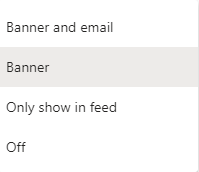
Type of Notification on Microsoft Teams

  • Banner and Email
  • Banner
  • Only Show in feed
  • Off
Microsoft Teams Notifications Not Working Type of Notification on Microsoft Teams
Type of Notification on Microsoft Teams

Different ways to Send Notifications on Microsoft Teams

  • Email notifications
  • SMS/text notifications
  • Teams messages
  • Adaptive cards
  • Channel posts

Troubleshoot Teams notifications

Microsoft Teams provides several methods for accessing, receiving, and managing alerts. These options include how, when, and where your signs display, custom channel and chat settings, look and audio, turning off certain messages, and so on.

Troubleshooting steps

  • Check your Teams Settings
  • Enable notifications if they are not enabled. You may enable them by clicking the drop-down box and selecting the type of notification you desire.
  • If, Notifications are enabled:

    Settings -> General -> Application to see whether you must keep the program running selected upon closing.
  • If, Notification settings are perfect. Check that the program is operating in the background.

    On Windows: Locate the System Tray on your desktop’s bottom toolbar. Confirm that the Teams icon is in the tray by clicking the up arrow. If it is not present, your program is not executing in the background.
  • If the Notification program is up and running on your system, check for the Teams Update.

How to check for the Teams Update?

  • Click on the Profile icon.
  • Check for updates is selected.
  • A quick notification beneath your search bar stating that Teams will check for updates and install them.
  • If there are any updates available, they will be installed.
  • It is advised that you restart your computer after the installation is complete.

A Guide to Slack: How to Use Slack in 2022 Detailed Explanation

1
How to use slack

Slack is a channel-based messaging platform for organisations. When perfectly knowing how to use Slack for your team, you can communicate via instant messaging, connect tools your team already uses and collaborate more effectively. 

Many people might be curious why a business tool is called “Slack”. But the name is the acronym for “Searchable Log of All Conversation & Knowledge”

1. Why Slack is the Tool For You

So it’s clear that it is all about communication, but why exactly you should use Slack for your business conversations. Keeping your benefits in mind, we have come up with reasons you should prefer to use it:

  • It integrates with several apps you’re already using, like Droplr, Google Doc, Jira, and Salesforce, thus providing ease of use.
  • Want to make a quick phone or video call? Call or video chat with teammates with a few clicks of your mouse. 
  • Sometimes showing is better than telling. The screen sharing feature makes sharing your screen with colleagues quick and easy. 
  • No need for email attachments – share your files through file integration with a simple drag and drop. 

How to Use Slack for Business

No two Businesses use Slack the same, but the end goal is to give teams a place to stay connected without wasting time in their inboxes or juggling a bunch of apps.

Some of the practical things you can do for your business:

  • Use multiple tags. For example, by just using  @ symbol and the username for each person, you can get a notification about the message.
  • Another overlooked feature is related to stars. You can click the small star icon on any channel or message. Then, you can quickly see everything you’ve starred.
  • It has a built-in poll function. You use it by typing “/poll” and naming the poll. This allows everyone to weigh in on a topic without you having to wade through countless messages.
  • Another major timesaver lets you quickly edit your most recent message in a channel. Just press the up arrow, and you’ll soon see the message in an editing window.
How to use Slack
Edit messages using Slack

How to use Slack App

  • To get started, download the desktop app
  • From the sidebar, you can access your conversations in Slack. You’ll see a list of channels you’ve joined and your direct messages, notifications for specific conversations and the option to compose new messages. 
Slack
Message sidebar in Slack
  • Channels are fundamental to working in Slack – they bring the right people and information together in one place and make it possible to organise work around a common purpose.
  • When working in Slack, you have various messaging options available from the message field to help you communicate and connect with your team. 
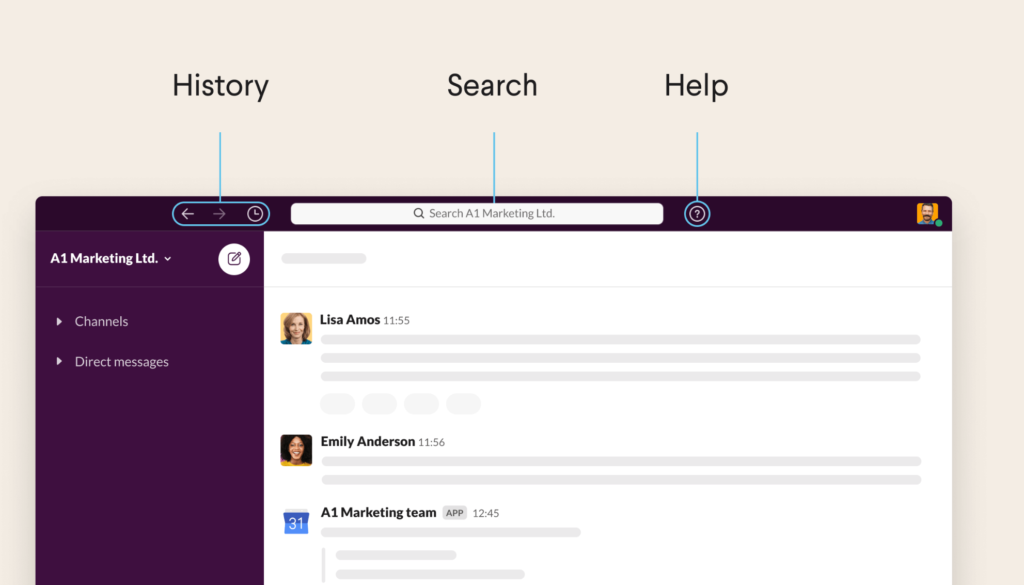
  • Use the navigation icons to go back and forth in your history (just like you would in a web browser), view recent conversations, search for information, or get help with Slack. 
Slack how to
Slack Navigation icons

How to use Slack for Project Management

On its website, the company states:

“Slack shouldn’t replace the tools you already use for project management — but it does make them better.”

At its core, it is a communication tool but helps you connect better with the project management tools such as Jira, smartsheet.

You can Create project-specific channels, Connect the tools you already use, Automate reminders, Come back to a message at a later time and many more interesting and productive things.

How to use slack reminders

How to use Slack for Task Management

  • Integrate a task management app: Add a task management tool such as Trello, Todoist, or Wunderlist, so you don’t have to leave it to add items to your personal or team task list.
  • Use /todo or /mytodo commands
  • Pin or save messages

Suggested integrations for task management

How to use slack for task management
Integrate Apps with Slack

Benefits of Slack

Fact: Freelancers are among those who benefit most from using it because they can use it as a way to build referrals. They say that freelance workers make up about 34 percent of the workforce in the US, and 81 percent of freelancers refer work to fellow freelancers.

  • By integrating with Google Drive, you can genuinely keep everything in one place. We use this to keep track of the links we earn, making an SEO audit much more manageable. Because everyone can collaborate, it’s easier to make sure you cover all of your bases.
  • Set reminders for yourself or others — You can use built-in reminders or Google Calendar and add many other to-do lists to remind volunteers of upcoming events or deadlines.
how to use slack to create reminder
How to create a reminder on Slack
  • Create a fun community space accessible by your staff and volunteers, whether or not they’re in the office! 
  • File Sharing Integration: There is no need to attach files to emails where you may have to worry about file size. Drag and drop them right into the tool for easy file sharing. If you need to reference the file later, the built-in search function will take you right to it.

Slack Pricing

Slack Pricing comes in 4 different modes:

  1. Free: €0/mo
  2. Pro: €6.25/mo
  3. Business+: €11.75/mo
  4. Enterprise Grid

Conclusion

Slack has become a great helping tool in running businesses across the globe, and below are a few takeouts from the goal specifications:

  1. Streamline tasks and document internal communication among workers
  2. Encourage timely, open communication and a collaborative company culture
  3. Keep employees productive through apps and integrations

To know about various features in Microsoft Teams, Checkout How to Add Custom Stickers in Microsoft Teams

Microsoft Teams Status Not Updating?

1
Microsoft Teams Status Not Updating

When you are working in a Teams environment, it becomes essential for you to update Microsoft Teams status regularly so that your team is aware of your availability.

In many instances, you may face issues with Teams status for several reasons. This post will teach you how to resolve Microsoft Teams status update issues.

Microsoft Teams Status Not Updating?

We are going to look into real-time queries asked by the Microsoft teams users:

Microsoft Teams status not updating or showing the wrong status?

My company uses Microsoft Teams for chats, video calls, meetings, etc. The user’s status doesn’t always update and stay updated for the status you pick. It may show correct for your viewing but not your team members. At times it doesn’t hold my status on my end. It auto-changes status, for example, it may say I am away but I am really available. I didn’t select away as my status. I change to available but it still shows away to my team members. Is this a known issue? How can it be resolved? It is causing communication issues for my company and our work flow.

You may try the following things:

Solution 1:
Re-add your outlook profile; in many instances, this process resolves the issue.

How to Remove an outlook profile? 

  • Close Outlook application
  • Click on the start menu (Windows)
  • Search control panel
  • Go to ‘Mail’
  • Click on Show Profiles; the default says Outlook,
  • Click on Remove the profile
  • Apply changes, then click on ok
  • Open Outlook now and enter a profile name Outlook
  • Restart teams; if this doesn’t restart your system.

    Solution 2:

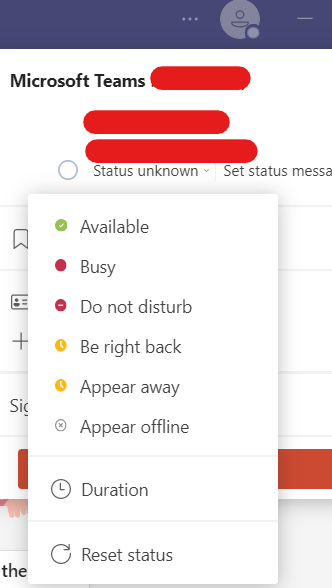
    Reset status  
Microsoft Teams Status Not Updating?

Reset Microsoft Teams Status 

Solution 3:

Update Teams to the Newest version

Solution 4:

Check Settings in the teams; Your Outlook might be interfering with the calendar’s availability.

Types of Status on Microsoft Teams

  1. Available
  2. Busy
  3. Do not disturb
  4. Be right back
  5. Appear away
  6. Appear offline

How to Add Custom Stickers in Microsoft Teams

4
Add Custom Stickers in Microsoft Teams

Nothing is more exciting than using your Stickers in chats; Microsoft Teams allows you to add custom stickers.

Custom Stickers is an app on Microsoft Teams that allows you to save and send your stickers to Microsoft Teams.

Custom Stickers is a management feature inside Teams that allows all of you to store and share GIFs with your colleagues, which is an excellent way of visual communication and expressing your feelings.

In this post, you can learn how to add customs stickers to your Microsoft Teams.

Add a Custom Stickers in Microsoft Teams

Upload stickers from your computer or phone, Or Save stickers from other messages; Or send your stickers in chat

Add Custom App

From Chat option

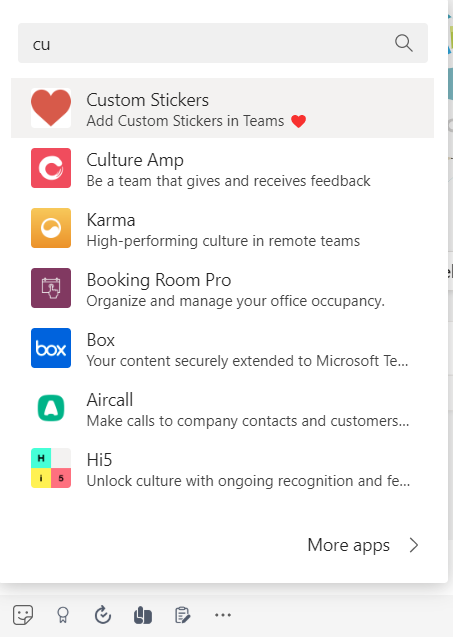
  • Go to more option
  • Search Custom Stickers
  • Add Customer Sticker App
Customer Sticker App
Add Custome Sticker in Teams
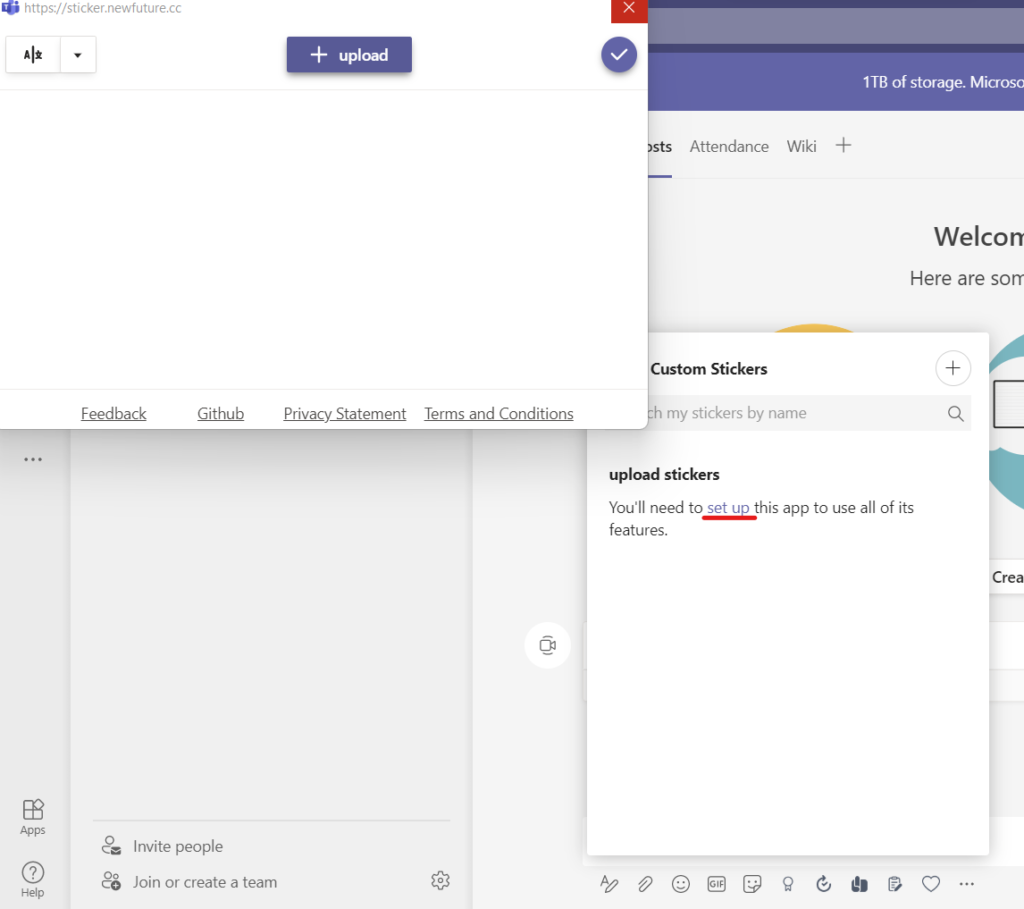
  • Setup and upload stickers to the Customer Sticker app
Upload stickers to the Customer Sticker app