Home Blog Page 6

“Unlock Time-Saving Features with Meta Business Suite: Manage Instagram & Facebook Accounts Easily”

0

Meta Business Suite is a social media management tool that allows you to manage your Instagram and Facebook accounts from one central location. With Meta Business Suite, you can schedule posts, engage with followers, analyze performance, and more.

Why to use Meta Business Suite?

There are a few reasons why you might want to consider using Meta Business Suite:

  1. Time-saving: Meta Business Suite allows you to manage your Instagram and Facebook accounts from one central location, saving you time and effort.
  2. Scheduling: With Meta Business Suite, you can schedule posts for your social media accounts in advance, so you don’t have to log in and post manually every day.
  3. Engagement: Meta Business Suite allows you to view and respond to comments and messages from your followers, helping you to increase engagement with your content.
  4. Analytics: Meta Business Suite provides analytics and insights about your social media performance, allowing you to understand how your content is performing and make informed decisions about your social media strategy.
  5. Ease of use: Meta Business Suite is user-friendly and easy to use, with a clean and intuitive interface. This makes it accessible for users of all skill levels.

How to use Meta Business Suite for Facebook

To use Meta Business Suite for Facebook, follow these steps:

  1. Sign up for an account: Go to the Meta Business Suite website and sign up for an account. You will need to provide your email address and create a password.
  2. Connect your Facebook account: Once you have signed up for an account, click on the “Add Accounts” button and follow the prompts to log in to your Facebook account.
  3. Create and schedule posts: From the dashboard, click on the “Create Post” button and enter your message. You can also add images or videos to your post. Choose Facebook as the account you want to post to, and schedule the post for a specific date and time.
  4. Engage with followers: Meta Business Suite allows you to view and respond to comments and messages from your Facebook followers. Simply click on the “Engage” tab to see a list of comments and messages, and use the built-in tools to respond.
  5. Analyze performance: Meta Business Suite provides analytics and insights about your Facebook performance. You can view metrics such as engagement, reach, and follower growth to understand how your content is performing.

How to use Meta Business Suite for Instagram

To use Meta Business Suite for Instagram, follow these steps:

  1. Sign up for an account: Go to the Meta Business Suite website and sign up for an account. You will need to provide your email address and create a password.
  2. Connect your Instagram account: Once you have signed up for an account, click on the “Add Accounts” button and follow the prompts to log in to your Instagram account.
  3. Create and schedule posts: From the dashboard, click on the “Create Post” button and enter your message. You can also add images or videos to your post. Choose Instagram as the account you want to post to, and schedule the post for a specific date and time.
  4. Engage with followers: Meta Business Suite allows you to view and respond to comments and messages from your Instagram followers. Simply click on the “Engage” tab to see a list of comments and messages, and use the built-in tools to respond.
  5. Analyze performance: Meta Business Suite provides analytics and insights about your Instagram performance. You can view metrics such as engagement, reach, and follower growth to understand how your content is performing.

Conclusion

In conclusion, Meta Business Suite is a social media management tool that allows you to manage your Instagram and Facebook accounts from one central location. It saves time, effort and allows to schedule posts, engage with followers, analyze performance, with a user-friendly interface.

Additionally, it provides step by step instructions on how to connect and use the tool for both Instagram and Facebook. With Meta Business Suite, businesses and individuals can improve their social media presence and performance, making it easier to track and manage their accounts.


4 fast and easy step to connect Messenger to Instagram in 2023

2
How to Post on Instagram From Desktop

When it comes to this topic how to connect Messenger to Instagram, a considerable amount of information is out of date and there’s a lot more complexity to setting up a social media.So just follow the 4 easy steps that given below to connect Messenger to Instagram which works both on iOS and Android.

Connect Messenger to Instagram in 2023

Step 1

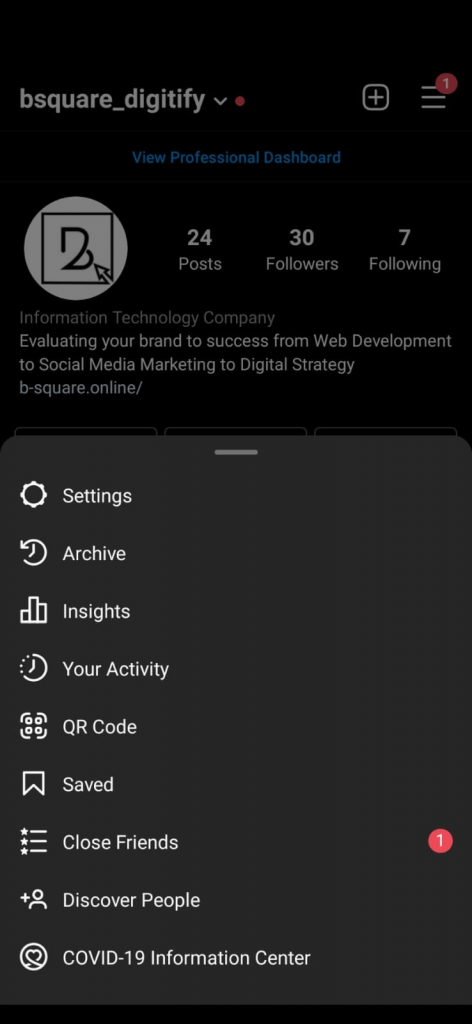
Open up your Instagram app on your phone, and tap the three lines on top from your profile, and you can see the list of action in the menu.

Step 2

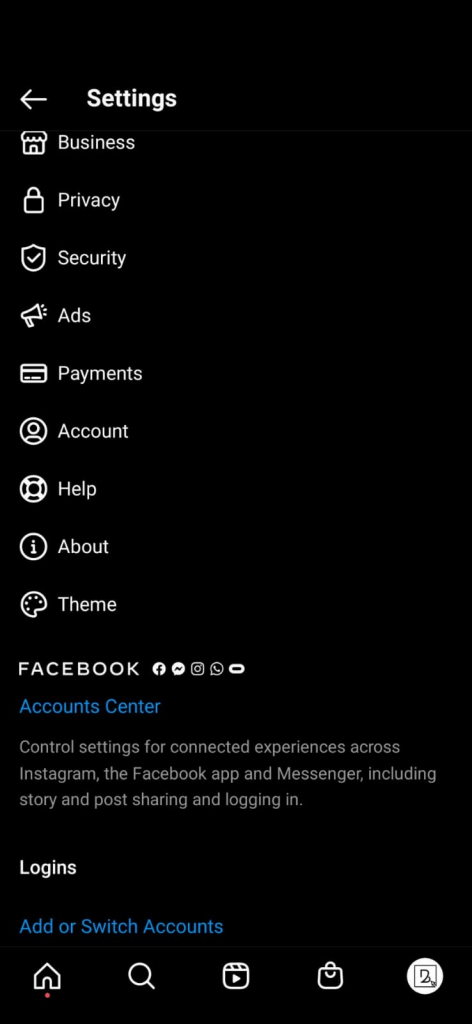
Go to settings. Now, in the settings you want to scroll down until you see Facebook and right below ‘Account center’ in blue letters that indicates it’s a link.

Step 3

So now in the Facebook Accounts center you want to click ‘Set up Account Centre’.You will be able to see ‘Add accounts’ to enable connected experiences and that’s exactly what we want. We want to connect our Facebook Messenger to Instagram Click Add accounts.

As you can see here, Instagram account. I was just on is appeared here, and the Facebook account that I want to link to it. You can change it if you have a different Facebook account you want to link to this one, for example, if you want to link your company’s account. You can just change.

Step 4

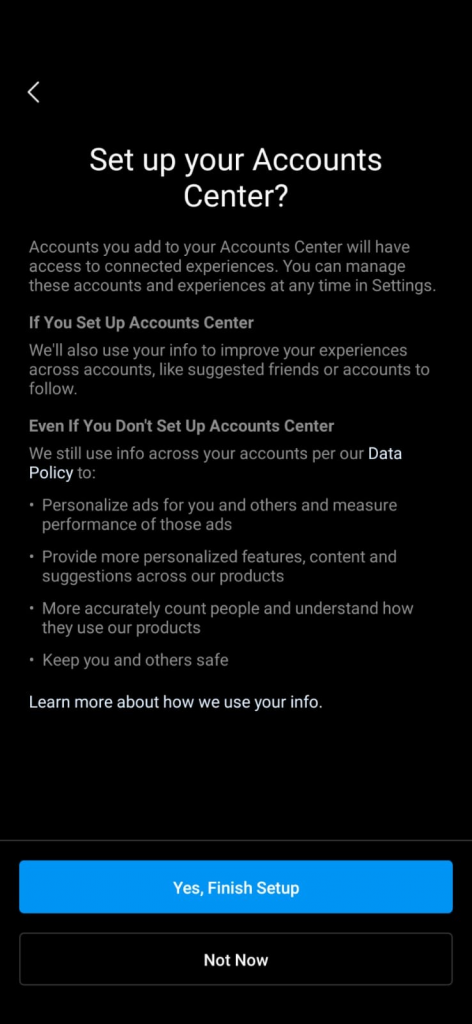
Then click continue. In the next page, it will ask ‘Do you want to set up your account center’. Yes and click ‘finish setting up’.

And now, you can see, it comes with profiles that they’re both connected through Instagram.

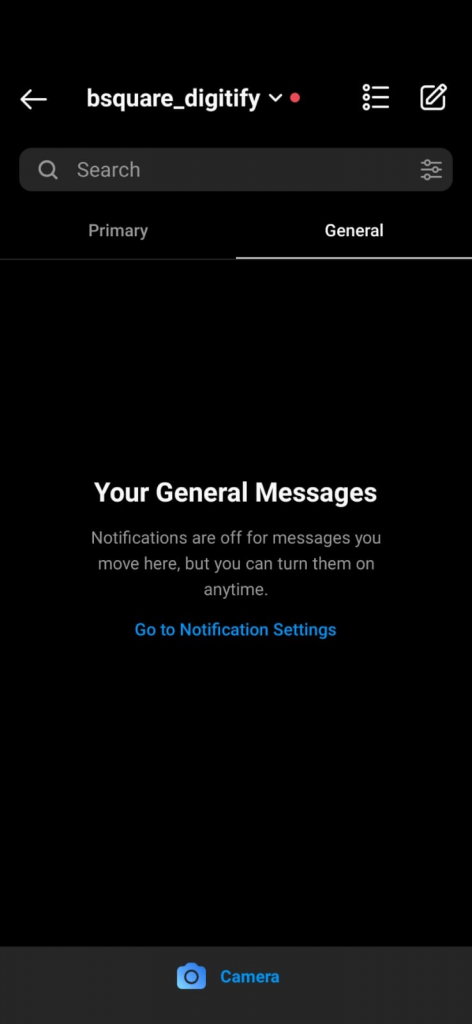
As you can see here, and I go to my messages.

I can see all the messages I have.

That’s it.

This simply you can connect messenger to Instagram in 2022.

Read more : Learn about retargetting in less than 5 minutes.

Top Social Media Auto Post WordPress Plugins for 2023

0
Content Marketing Strategies

Are you looking for the best WordPress social media auto post plugin?

Stay tuned as we reveal the best WordPress plugins for social media automation!

You simply cannot ignore the power of social media marketing in today’s world. However, managing and promoting your business on multiple social networks at the same time can be challenging.

So, what is the solution? The social media auto-post plugin is the solution. It’s an excellent tool for automating social media, creating a large number of posts, and meeting your social media marketing strategy.

Why Should I Auto Post Blogs on Social Media?

There are a few reasons why you might want to consider automating the posting of your blog on social media:

  1. Time-saving: Automating the posting of your blog on social media can save you time and effort, as you won’t have to manually log in to each social media account and post the blog yourself.
  2. Consistency: Automating the posting of your blog can help you maintain a consistent presence on social media, even if you don’t have the time to manually post every day.
  3. Reach: Automating the posting of your blog on social media can help you reach a wider audience, as your posts will be seen by more people on different platforms.
  4. Engagement: Automating the posting of your blog on social media can help increase engagement with your content, as your posts will be seen by a larger number of people. This can lead to more comments, likes, and shares, which can help increase the visibility of your blog.

List Social Media Auto Post WordPress Plugins

I can provide you with a list of some popular WordPress plugins that can help you automate your social media posting.

  1. Hootsuite: This plugin allows you to schedule and publish social media posts from your WordPress dashboard. You can also track the performance of your posts and interact with your followers.
  2. Buffer: This plugin allows you to schedule and publish social media posts in advance. It also provides analytics to help you track the performance of your posts.
  3. CoSchedule: This plugin is a comprehensive social media management tool that allows you to schedule and publish posts, collaborate with team members, and track the performance of your social media campaigns.
  4. Social Pug: This plugin allows you to easily share your blog posts on social media platforms, as well as display social media buttons and follow buttons on your website.
  5. Revive Old Post: This plugin helps you repost your old blog content on social media platforms to keep your profiles active and attract new readers.
  6. OnlyWire: This plugin makes it easy to automatically post your blog content to multiple social media accounts at once.
  7. WP to Buffer: This plugin allows you to schedule and publish posts to your Buffer account, which can then be automatically shared on your social media accounts.
  8. Social Media Auto Publish: This plugin allows you to automatically publish posts to your social media accounts, as well as import social media posts as WordPress comments.
  9. Social Networks Auto Poster: This plugin allows you to automatically publish your blog posts to multiple social media accounts, as well as customize the appearance of your shared content.
  10. IFTTT (If This Then That): This plugin allows you to automate actions between your website and other online services. For example, you can set up a rule to automatically post new blog content to your social media accounts.
  11. Jetpack: This plugin includes a feature called Publicize that allows you to automatically share your blog posts on social media platforms. It also offers a range of other features such as security, performance, and design tools.

It’s important to note that you should carefully research and evaluate any plugin before installing and using it on your website. You should also keep your plugins up to date to ensure they are secure and functioning properly.

Top 10 Best VPN Netherlands

0
10 Best Free VPN Chrome Extensions of 2022

Whether you live in the Nederland or are just passing through, these are the best VPNs with a strong presence there.

While many of the more popular VPN services offer similar features, there are a few that stand out and set some apart from the rest.

What is a VPN or Virtual Private Network?

A VPN, or Virtual Private Network, is a privacy tool that helps keep you safe and secure while browsing the internet. You can stream geo-restricted content, visit websites that would otherwise be inaccessible, and do a lot more.

When you use a VPN to connect to the internet, your internet traffic is routed through an encrypted tunnel to the VPN server. This helps to keep third parties, such as your internet service provider (ISP) or government agencies, from monitoring or tracking your online activity. It also allows you to appear to be in another location, which is useful for accessing content that is restricted in your region.

When you use a VPN to connect to the internet, your internet traffic is routed through an encrypted tunnel to the VPN server. This helps to keep third parties, such as your internet service provider (ISP) or government agencies, from monitoring or tracking your online activity. It also allows you to appear to be in another location, which is useful for accessing content that is restricted in your region.

Not all VPNs are the same! Sure, most will provide you with the same basic security features, but if you want the absolute safest or the fastest, we’ve got you covered.

There are literally hundreds of VPN providers to choose from, but we’re here to take the guesswork out of selecting the best VPN for you.

Top 10 Best VPN Nederland

  1. VPN Nederland – a highly secure virtual private networks (VPNs) and VPN services in the Netherlands. It appears to offer reviews and comparisons of different VPNs, as well as general information about how VPNs work and the benefits of using them.
  2. ExpressVPN – a popular VPN service with servers in over 90 countries. It is known for its fast speeds and strong security measures, including 256-bit encryption and a no-logs policy.
  3. Surfshark – a VPN service with a large network of servers and strong security features, including a kill switch and protection against leaks. It also has a no-logs policy and is known for its affordability.
  4. CyberGhost – a VPN service with a user-friendly interface and servers in over 90 countries. It has strong security features, including 256-bit encryption and a no-logs policy, and is known for its fast speeds.
  5. Private Internet Access (PIA) – a VPN service with a strong focus on privacy and security. It has a no-logs policy and offers a variety of security features, including a kill switch and protection against leaks.
  6. Hotspot Shield – a VPN service with a large network of servers and a focus on fast speeds. It has a no-logs policy and offers basic security features, such as 256-bit encryption.
  7. PureVPN – a VPN service with servers in over 140 countries and a variety of security features, including a kill switch and protection against leaks. It has a no-logs policy and is known for its affordability.
  8. VyprVPN – a VPN service with servers in over 70 countries and strong security measures, including 256-bit encryption and a no-logs policy. It is known for its fast speeds and has a variety of features, such as a kill switch and protection against leaks.
  9. Zenmate – a VPN service with a large network of servers and a focus on fast speeds. It offers basic security features, such as 256-bit encryption, and has a no-logs policy.
  10. HMA (HideMyAss) – a VPN service with servers in over 190 countries and a variety of security features, including a kill switch and protection against leaks. It has a no-logs policy and is known for its fast speeds.

Best Free VPN Netherlands

There are many free VPN services available, but keep in mind that free VPNs often have restrictions such as data limits, speed limits, and may have less server options. Here are a few free VPNs that have servers in the Netherlands:

  1. ProtonVPN: This is a free VPN service that has servers in the Netherlands and other countries. It does not have any data limits and allows you to use it on unlimited devices.
  2. Windscribe: This is another free VPN service that has servers in the Netherlands and other countries. It provides a generous data allowance of 10GB per month and allows you to use it on unlimited devices.
  3. Hotspot Shield: This is a free VPN service that has servers in the Netherlands and other countries. It provides a data allowance of 500MB per day and allows you to use it on one device.

I recommend doing your own research and carefully considering the limitations of free VPNs before using one. It’s also worth noting that a paid VPN service may offer better performance and more features than a free one.

Do You Know! Popular Websites Use These Amazing Tools to Rank Blogs in Search Engine

0

Ranking your blog posts in search engines refers to the process of optimizing your blog posts to appear higher in search results for specific keywords. When someone searches for a particular term on a search engine like Google, the search engine returns a list of results that it considers most relevant and authoritative.

By optimizing your blog posts with relevant and targeted keywords, you can increase the chances that your posts will rank well in search results and attract more traffic to your website.

Ranking well in search results can be especially beneficial for small businesses and organizations, as it can help increase their visibility and reach, and ultimately drive more leads and sales.

Ranking your blog posts in search engines can bring a number of benefits to your business or organization:

  • Increased visibility: By ranking well in search results, your blog posts will be more visible to potential readers who are searching for information on a specific topic. This can help you attract new visitors to your website and increase your reach.
  • More traffic: Higher rankings in search results can lead to more traffic to your website. As more people discover and visit your blog posts, you can potentially generate more leads and sales.
  • Improved user experience: Ranking well in search results can also improve the user experience for your visitors. If people can easily find your blog posts when they are searching for information, they are more likely to have a positive experience on your website.
  • Increased credibility: Ranking well in search results can also increase the credibility of your business or organization. If people see your blog posts ranking well for relevant keywords, they may perceive your business as an authority in your industry.

Overall, ranking your blog posts in search engines can help you attract more visitors, improve the user experience for your visitors, and increase the credibility of your business

How To Rank Blogs in Search Engine?

There are a few ways you can check if your blog posts are ranking well in search engines:

  1. Use a keyword tracking tool: There are many tools available that allow you to track the ranking of specific keywords on search engines. These tools can provide you with valuable insights into how well your blog posts are ranking for specific keywords, as well as how much traffic those keywords are generating for your website.
  2. Check your website’s analytics: Most websites have an analytics tool, such as Google Analytics, installed to track traffic and other metrics. You can use this tool to see how much traffic your blog posts are generating, and from which sources. This can give you an idea of how well your blog posts are performing in search engines.
  3. Monitor your search engine rankings manually: You can also manually check your search engine rankings by searching for specific keywords related to your blog post and seeing where your website appears in the search results. Keep in mind that search engine rankings can vary depending on the location and device of the searcher, so it’s best to do this from multiple locations and devices to get a more accurate picture.

By tracking your search engine rankings and traffic, you can get a better understanding of how well your blog posts are performing and identify any areas for improvement.

Top 10 Keyword Tracking Tools

Here is a list of 10 keyword tracking tools that you can use to track the ranking of your blog posts:

Top 10 Keyword Tracking Tools: Rank Blogs in Search Engine
  1. Google Search Console: This is a free tool offered by Google that allows you to monitor and maintain your website’s presence in Google search results. With Search Console, you can see how Google crawls and indexes your website, and get alerts when there are issues that need to be addressed. You can also use it to track the performance of specific keywords and see how well your website is ranking for those keywords.
  2. Ahrefs: Ahrefs is a comprehensive SEO and keyword tracking tool that allows you to track your website’s performance in search engines, as well as the performance of your competitors. It offers a variety of features, including keyword rankings, backlink analysis, and website traffic analysis.
  3. SEMrush: SEMrush is a popular keyword tracking and SEO tool that offers a wide range of features, including keyword rankings, website traffic analysis, and backlink analysis. It also has a built-in keyword research tool to help you identify new keywords to target.
  4. MOZ: MOZ is a leading SEO software company that offers a range of tools for keyword tracking and website optimization. Its keyword tracking tool, MOZ Keyword Explorer, allows you to track your website’s rankings for specific keywords, as well as see the search volume and difficulty level of those keywords.
  5. SERPstat: SERPstat is a keyword tracking and SEO tool that offers a range of features, including keyword rankings, website traffic analysis, and backlink analysis. It also has a built-in keyword research tool to help you identify new keywords to target.
  6. Pro Rank Tracker: Pro Rank Tracker is a comprehensive keyword tracking tool that allows you to track the ranking of your website for specific keywords across multiple search engines and devices. It offers a range of features, including daily ranking updates, historical data, and customizable reports.
  7. AccuRanker: AccuRanker is a real-time keyword tracking tool that allows you to track the ranking of your website for specific keywords across multiple search engines and locations. It offers a range of features, including daily ranking updates, historical data, and customizable reports.
  8. RankRanger: RankRanger is a keyword tracking and SEO tool that allows you to track the ranking of your website for specific keywords across multiple search engines and devices. It offers a range of features, including daily ranking updates, historical data, and customizable reports.
  9. KWFinder: KWFinder is a keyword research and tracking tool that allows you to identify new keywords to target and track the ranking of your website for those keywords. It offers a range of features, including search volume data, keyword difficulty scores, and SERP analysis.
  10. SerpWoo: SerpWoo is a keyword tracking and SEO tool that allows you to track the ranking of your website for specific keywords across multiple search engines and devices. It offers a range of features, including daily ranking updates, historical data, and customizable reports.

Each of these tools has its own set of features and pricing, so you may want to do some research and compare them to find the one that best fits your needs and budget. It’s also a good idea to read reviews and try out a few different tools to find the one that works best for you.

5 Tips to Choose Keywords

Here are some tips for choosing keywords to rank your blog posts in search engines, specifically Google:

  1. Use long-tail keywords: Long-tail keywords are more specific, longer phrases that are less competitive and easier to rank for. They are often more targeted and can drive more qualified traffic to your website.
  2. Use relevant keywords: Choose keywords that are relevant to your blog post and the topic you are writing about. This will help Google understand the content of your post and improve its ranking.
  3. Use a mix of primary and secondary keywords: Primary keywords are the main focus of your blog post and should be included in the title, headings, and body of the post. Secondary keywords are related to the primary keywords and should be used throughout the post to add context and depth.
  4. Use keyword variations: Varying your keywords can help you rank for a wider range of search terms. For example, if you are writing about “running shoes,” you could also use variations such as “best running shoes,” “women’s running shoes,” and “running shoes for flat feet.”
  5. Use keyword research tools: There are many keyword research tools available that can help you identify the best keywords to target for your blog post. These tools can provide you with data on search volume, keyword difficulty, and more to help you choose keywords that are both relevant and achievable.

By following these tips, you can choose keywords that will help your blog posts rank well in search engines, specifically Google

The Guide to Marketing Campaign in HubSpot

0
What is HubSpot & Benefits of HubSpot

You must be wondering why do your business require a Marketing Campaign? Right?

Before we jump on the conclusion let’s first understand what exactly Marketing Campaign is

What is a Marketing Campaign?

A marketing campaign is a series of marketing efforts that are designed to promote a product, service, or idea. The goal of a marketing campaign is to raise awareness of the campaign’s message and encourage people to take a specific action, such as making a purchase or signing up for a newsletter.

Marketing campaigns can take many forms, including advertising, social media campaigns, email marketing, events, and more. They can be targeted at a specific audience or be more general in nature.

There are many reasons why you might want to create a marketing campaign. Some common goals of marketing campaigns include:

  • Increasing brand awareness: A marketing campaign can help people learn about your brand and what you have to offer.
  • Generating leads: A marketing campaign can help you attract new potential customers or clients who may be interested in what you have to offer.
  • Boosting sales: A marketing campaign can help you drive sales of your products or services.
  • Building customer loyalty: A marketing campaign can help you build stronger relationships with your existing customers and encourage them to continue doing business with you.

Overall, a marketing campaign is an important tool for promoting your business and reaching your marketing goals.

How To Create a Market Campaign

To create a marketing campaign in HubSpot, follow these steps:

  1. Log in to your HubSpot account and go to the Marketing Hub.
  2. Click on the “Campaigns” tab in the main navigation menu.
  3. Click on the “Create campaign” button in the top right corner of the page.
  4. Give your campaign a name and select a type from the dropdown menu. The available campaign types are:
  • Email
  • Ad
  • Social
  • Event
  • Other
  1. Click on the “Create campaign” button to create the campaign.
  2. You can then add elements to your campaign such as emails, ads, and social posts by clicking on the relevant tabs in the campaign editor.
  3. When you’re finished creating your campaign, click on the “Publish” button to make it live.

I hope this helps! Let me know in the Comments if you have any other questions.

New Features in Salesforce That Will Change the Face of the CRM

0
Cloud computing, Cloud Computing, Cloud technology concept

Salesforce is a customer relationship management (CRM) platform that helps businesses manage and track customer interactions and data. It includes a range of tools for managing customer interactions and data, including sales, customer service, and marketing automation.

Benefits of Salesforce CRM

There are many features that might be useful for your business let’s go through some of the benefits of using Salesforce include:

  • Improved customer relationships: Salesforce helps businesses track and manage customer interactions and data, which can help improve customer relationships.
  • Increased efficiency: By automating and streamlining processes, Salesforce can help businesses save time and reduce the number of manual tasks.
  • Better data management: Salesforce allows businesses to store and manage customer data in one central location, which can help improve data accuracy and make it easier to access and analyze customer data.
  • Customization: Salesforce allows businesses to customize the platform to meet their specific needs and goals.
  • Integration: Salesforce can be easily integrated with other business systems, making it a flexible and scalable solution for businesses of all sizes.

Which are the new Features in Salesforce?

Salesforce frequently releases new features and updates to its platform. Some examples of new features that have been released in recent years include:

  • Einstein AI: This feature uses artificial intelligence to help users make more informed decisions, predict outcomes, and automate processes.
  • Lightning Web Components: This is a new programming model for building Lightning components, which are reusable components that can be used to build applications on the Salesforce platform.
  • Salesforce AppExchange: This is a marketplace where users can find and install applications that integrate with Salesforce, such as CRM tools, productivity apps, and other business-related tools.
  • Salesforce Customer 360: This feature allows users to unify customer data from multiple sources, including CRM data, marketing data, and data from other systems, to get a complete view of the customer.
  • Salesforce Einstein Voice: This feature allows users to interact with Salesforce using natural language voice commands, making it easier to access and update information on the go.

These are just a few examples of the many new features that have been released by Salesforce in recent years. Keep in mind that this is not an exhaustive list, and Salesforce continues to release new features and updates on a regular basis.

Lower Productivity denting Salesforce growth

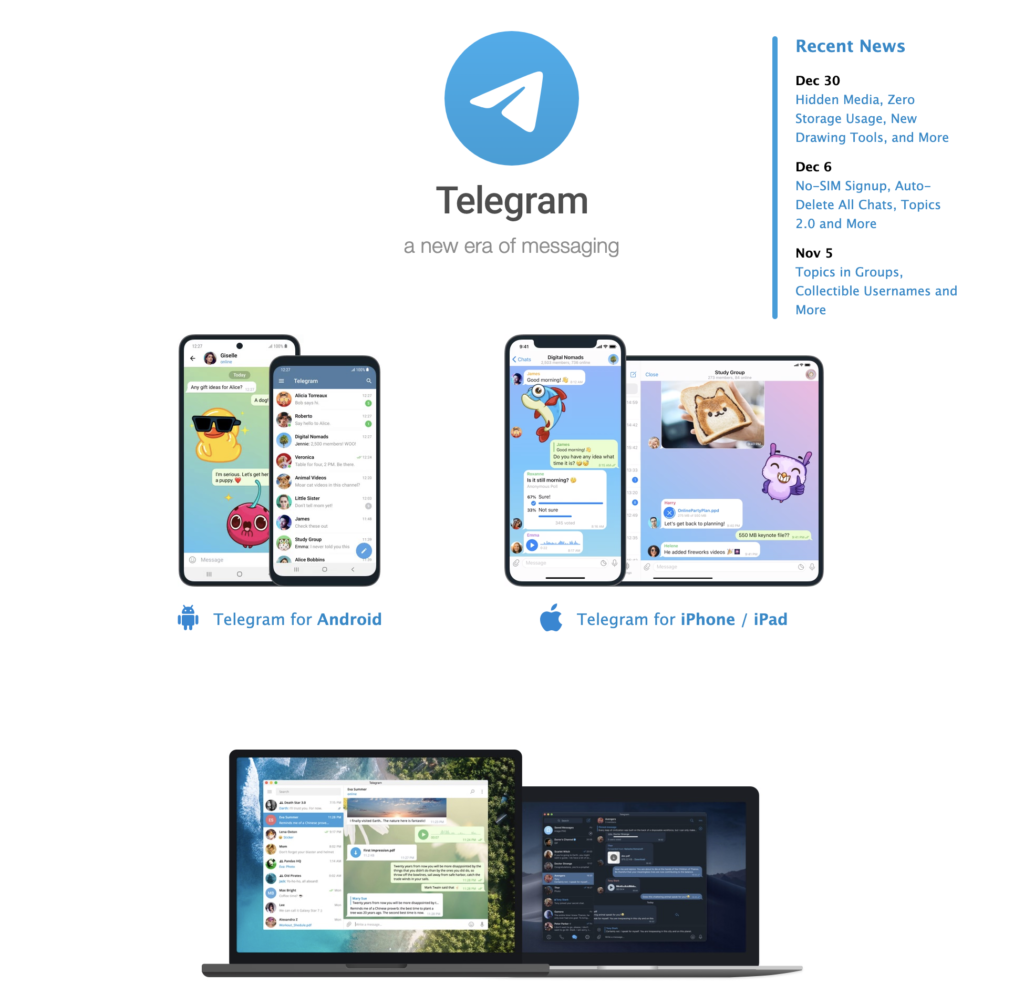
Telegram’s Exciting Updates in 2023 have Hidden Media, New Drawing Tools, Zero Storage Usage and More

0

With new year in full swing, Telegram’s Exciting Updates in 2023 will brighten up your new year. This update offers some pleasant updates like, media with spoiler effects, new ways to save space on your device, new drawing tools, suggested profile pictures, and more.

Below is the the list of Telegram’s Exciting Updates in 2023.

List of Telegram’s Exciting Updates in 2023

Hidden Media

Telegram supports spoiler formatting to hide any text in messages. Now you can also cover photos and videos with a shimmering layer that blurs the image. It will take your recipients one tap to break the spell and see the content.

Zero Storage Usage

Telegram can take up next to no space on your device. You can remove media and documents from your phone’s storage and re-download them from your Telegram cloud at any time. For years, users could set a maximum cache size or auto-remove unused items after a period of time.

With this update, you can add separate auto-remove settings for cached media from Private ChatsGroups, and Channels – with exceptions for specific chats.

The new pie charts help visualize what’s taking up space, and dedicated tabs for MediaFiles and Music let you clear the largest items in just a few taps.

On iOS, we’ve greatly reduced the time it takes the app to calculate your cache size. Android users are in luck – their app was already doing this at top speed.

New Drawing and Text Tools

In Telegram’s Exciting Updates in 2023, its already powerful media editor has been fully redesigned. Drawing tools dynamically change width based on drawing speed and automatically smooth your lines.

There is a new blur tool to redact sensitive data (or photobombers) – and 5 high-precision ways to choose colors, including the Eyedropper tool.

When adding text to photos or videos, you can now change its size, font, and background. Adding custom animated emoji to text on images is available for all users, even if they don’t have a Telegram Premium subscription.

To quickly add shapes like rectanglescirclesarrowsstars, and chat bubbles, tap the “+” button. You can also hold the surface to fill the canvas with color – or to erase everything.

Telegram's Exciting Updates in 2023 have Hidden Media, New Drawing Tools

Profile Pictures for Your Contacts

When editing your contacts, you can choose a picture for them – only you will see it on their profile.

If you have a good profile picture for your contact, you can suggest it to them. It will take them just two taps to add it to their profile.

This update also lets you achieve ultimate profile picture privacy: you can set visibility to ‘Nobody’ and add some users or groups as exceptions.

Hiding Group Members

Tools like the aggressive anti-spam setting help chat admins keep large groups clean – but some groups may also want to protect their members from unwanted personal messages.

Admins of groups with 100+ members can now choose to hide the member list. This way, if people don’t send messages to the group, only its admins will know they were there.

New Progress Animations on Android

Smooth new animations have been added when jumping to a faraway reply in a busy chat and to other pages throughout the app.

New Animated Emoji

Premium users get 10 new packs of custom animated emoji as a present from Telegram artists.

More Interactive Emoji

We keep expanding our universe of interactive emoji. To watch full-screen effects in sync with your chat partner, send a single in any 1-on-1 chat and then tap on it.

All these emoji can now be used as reactions – the Moai face will be particularly useful to see off 2022.

Topics for Groups of Any Size

Topics are now available in all groups, regardless of size – giving everyone a new way to organize discussion.

Read More: Telegram’s Latest Update in 2023 Includes Revamped Media Editor with Blur Tool

New features in HubSpot 2023

0
What is HubSpot & Benefits of HubSpot

It’s difficult to predict exactly what new features we’ll see in HubSpot in 2023, but some potential updates could include:

  1. Improved personalization: HubSpot is already known for its personalization capabilities, but we could see even more advanced features in the future. This could include more advanced targeting and segmentation tools, as well as improved machine learning algorithms that can predict customer behavior and interests.
  2. Enhanced e-commerce capabilities: HubSpot is already a popular choice for e-commerce businesses, but we could see even more advanced features in the future. This could include improved inventory management tools, as well as better integration with popular payment gateways like PayPal and Stripe.
  3. Improved customer service tools: HubSpot is already known for its customer service features, but we could see even more advanced capabilities in the future. This could include more advanced chatbots and automated workflows, as well as better integration with popular customer service tools like Zendesk and Freshdesk.
  4. Enhanced content management: HubSpot is already a popular choice for content management, but we could see even more advanced features in the future. This could include more advanced content scheduling and distribution tools, as well as improved integration with popular content management systems like WordPress and Drupal.
  5. Improved integrations with other tools: As with 2022, we could see more advanced integrations with other popular tools in 2023. This could include better integration with popular project management tools like Asana and Trello, as well as improved integration with social media platforms like Facebook and Twitter.

HubSpot’s New Features 2022, That Made HubSpot more than Just a Software

The few potential features from 2022 that still valuable in 2023 & Beyond:

  1. Improved artificial intelligence (AI) capabilities: HubSpot is already known for its advanced AI tools, but we could see even more sophisticated features in the future. This could include more personalized recommendations and automated workflows based on customer behavior and data.
  2. Enhanced marketing automation: HubSpot’s marketing automation tools are already powerful, but we might see even more advanced features in the future. This could include more advanced lead scoring and lead nurturing capabilities, as well as improved integrations with other marketing tools.
  3. Improved customer relationship management (CRM) tools: HubSpot’s CRM is already strong, but we could see more advanced features in the future, such as improved lead tracking and better integration with other CRM tools.
  4. Enhanced analytics and reporting: HubSpot is known for its robust analytics and reporting capabilities, but we could see even more advanced features in the future. This could include more granular data on customer behavior, as well as more advanced visualization tools to help businesses make better data-driven decisions.
  5. Improved integration with other tools: HubSpot already integrates with a wide range of tools, but we might see more advanced integrations in the future. This could include tighter integration with popular productivity tools like Trello and Asana, as well as better integration with social media platforms like Facebook and Twitter.

Telegram’s Latest Update in 2023 Includes Revamped Media Editor with Blur Tool

0

Telegram’s Latest Update in 2023 from the encrypted messaging platform includes an overhauled media editor outfitted with a bunch of new tools to decorate or conceal, parts of a user’s image and videos.

Telegram’s Latest Update in 2023 Includes Revamped Media Editor

According to The Verge, an American technology news website, as per a blog update, the platform is introducing a new blur tool that lets users block out certain areas of a photo or video.

This allows them to hide sensitive information, or blur the faces of passers-by who appear in the background. To make the blurred portion of your photo blend in, Telegram says you can use the eyedropper tool to match the colour of the blur brush to your image.

Further, when adding text to images or videos, Telegram for business is providing the ability to adjust the text’s size, font, and backdrop.

Telegram also added a way to quickly add shapes, such as rectangles, circles, arrows, stars, and chat bubbles by tapping the “plus” icon in the editor, reported The Verge.

Telegram’s Latest Update in 2023

Users can even apply a spoiler effect that adds a “shimmering layer” to an image or video that hides its contents until your recipient taps it.

Outside of image editing tools, Telegram’s latest update in 2023 includes new storage options that let you automatically remove cached data in private chats, groups, and channels after a certain period of time, all while excluding the chats of your choosing.

As per The Verge, there are several other minor features like settings that allow you to choose profile pictures for contacts that only you’ll see, newly animated and interactive emoji, a new progress animation on Android, and the ability for group admins to hide their member lists.

Telegram for business also added a way to quickly add shapes, such as rectangles, circles, arrows, stars, and chat bubbles by tapping the “plus” icon in the editor.

Also Read: Facebook Algorithm Change in 2023