Moving your one-on-one or group conversation to a new window is an easy and excellent method to quickly get more done in a meeting or on the phone with Microsoft Teams.
And what’s more convenient is that you can resize, relocate, or close the window.
How to Pop out chats on MS Teams
From the chat list
Select the Chat icon to open the chat list from the left side on Teams.
Find the chat you want.
Select More options icon
Now click on the Pop-out chat icon New breakout icon. Or, double-click the chat name, and you’ll see a new pop-out chat window.
Chat Pop-out icon MS Teams
Chat icon MS Teams
Hovering over a chat
When you hover over a chat, the pop-out chat icon appears. Select it to bring up a new pop-up chat window.
Pop out by Hovering over a chat
From the chat
Open a chat.
On the upper-right corner, there is a chat pop-out icon.
Click on the chat pop-out icon.
Pop-Out Chat on MS Teams
From profile image
To open a new window, double-click the profile image of the person you wish to talk to.
MS Teams is a team collaboration and video conferencing tool that Microsoft released in 2017. Microsoft Teams is a trustworthy, dependable, and feature-rich application that has amassed a sizable user base and is compatible with various operating systems.
This is a wonderful option if you need a quick, responsive, and bug-free collaboration tool. You can also connect MS Teams with Microsoft Office 365 products, which is a huge plus.
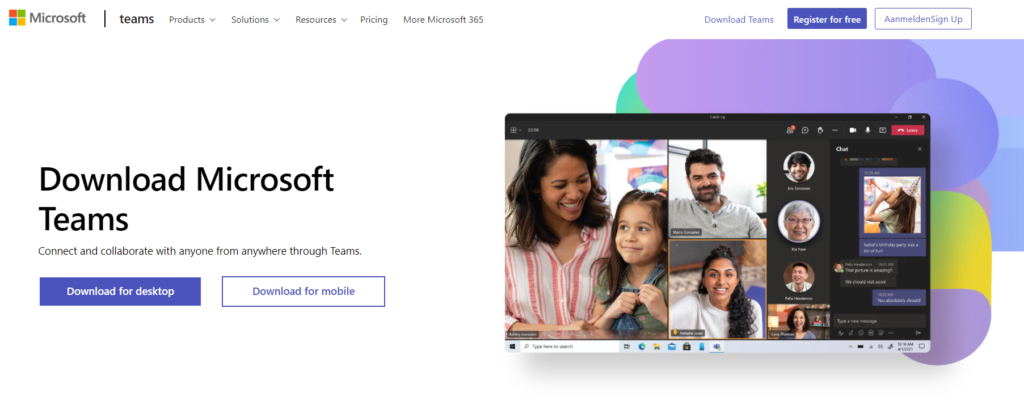
Download MS Teams for Windows
Teams may be downloaded and installed directly on your Desktop via teams.microsoft.com/downloads. Installing the Teams client on Windows PCs does not require administrative privileges, but it does on Macs.
The following operating systems support desktop clients:
Windows 32-bit and 64-bit versions (8.1 or later, except Windows 10 LTSC)
Windows 10 on ARM with ARM64 Server (Windows 2012 R2 or later)
Steps to Download and Install MS Teamsfor Windows
Step 1: Go to teams.microsoft.com/downloads
Download MS Teams
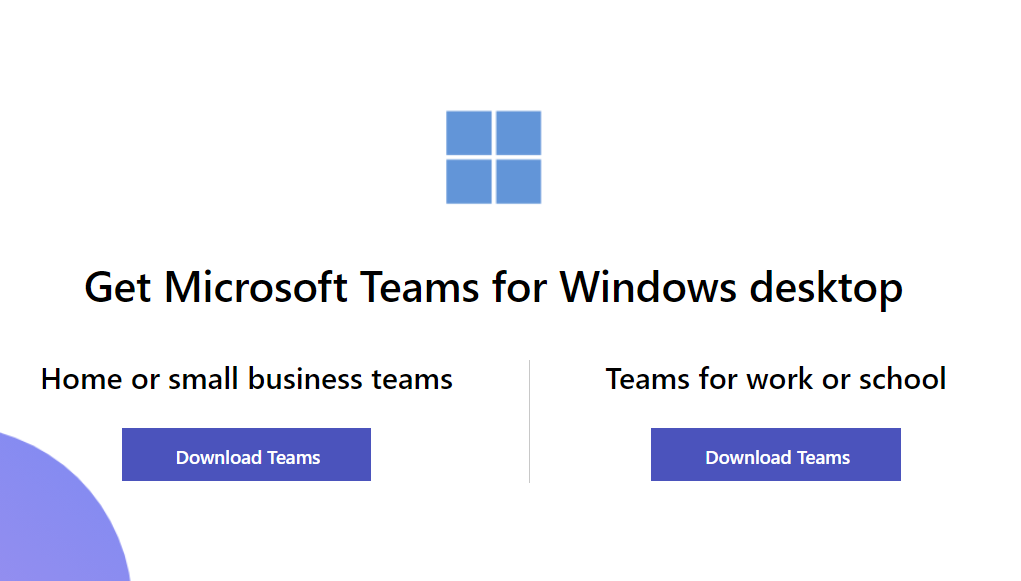
Step 2: Get Microsoftteams.microsoft.com/downloads
Teams for Desktop windows
Step 3: Install Microsoft teams on your Desktop
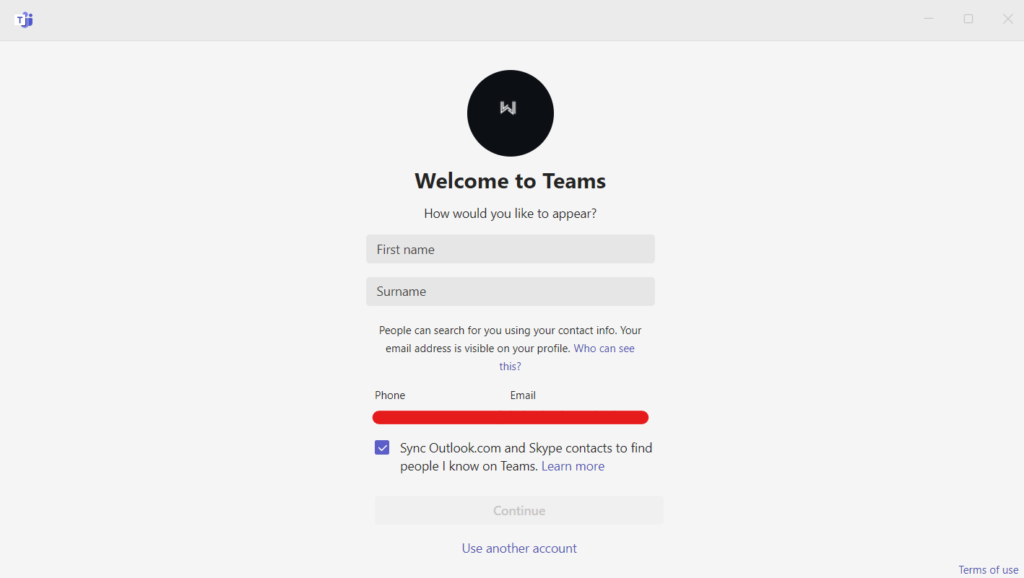
Step 4: Log in with your Microsoft account
Log in with your Microsoft account
Step 5: Upload your Profile pic
Click on the profile icon to change your profile image.
Step 6: Ready-Set-Go
Click on continue to finish the Teams set-up process; now, you can use Microsoft teams on your windows.
Facebook Ads Manager is a tool that allows you to design and manage Facebook & Instagram ads. All your Facebook campaigns, ad sets, and ads can be viewed and changed, and the results can be monitored using Ad Manager.
Follow the simple 4 steps to access ‘Ads Manager’ in Meta Business Suite.
On the left sidebar, click on Meta Business Suite.
Meta Business Suite
It will redirect you to the Meta Business Suite page. Meta Business Suite is a tool that combines Facebook, Instagram, and messaging technologies in one place to help you save time, make more connections, and improve your business results.
Alternatively, you can also visit business.facebook.com and select your respective page.
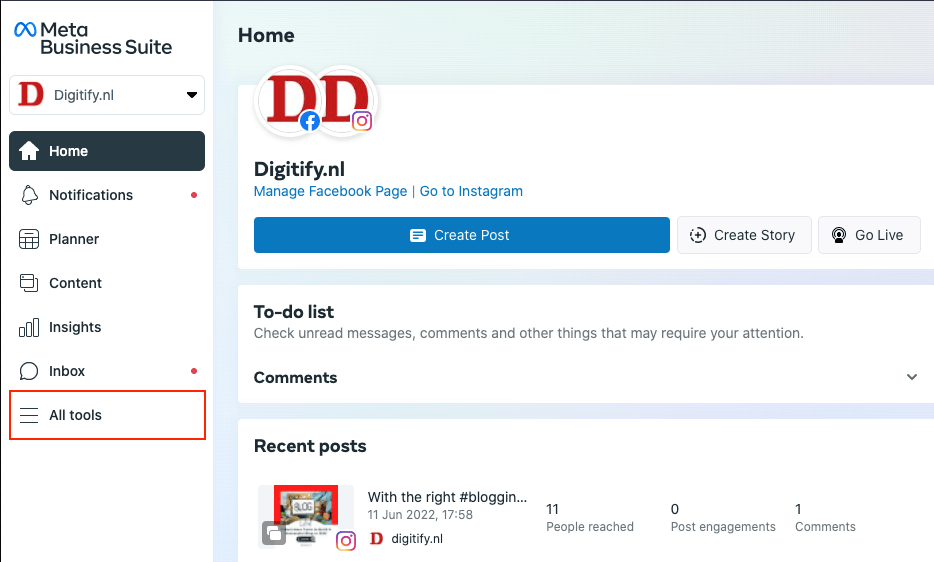
All Tools
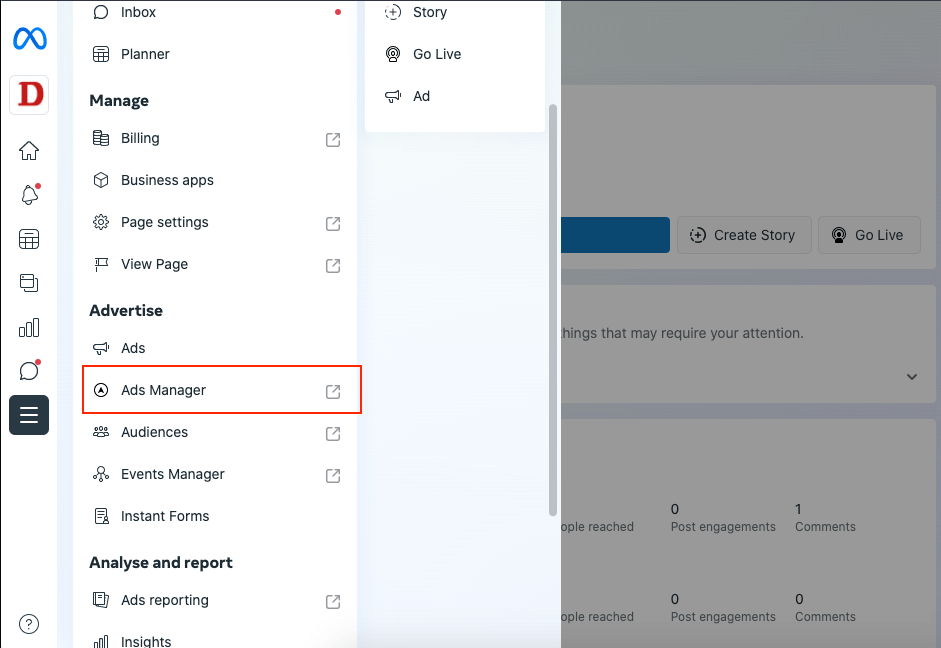
Click on the ‘All tools’ menu on the left sidebar.
All Tools
Ad Manager
It will open another popup menu. Then Click on Ad Manager.
Ads Manager
Manage your Ads
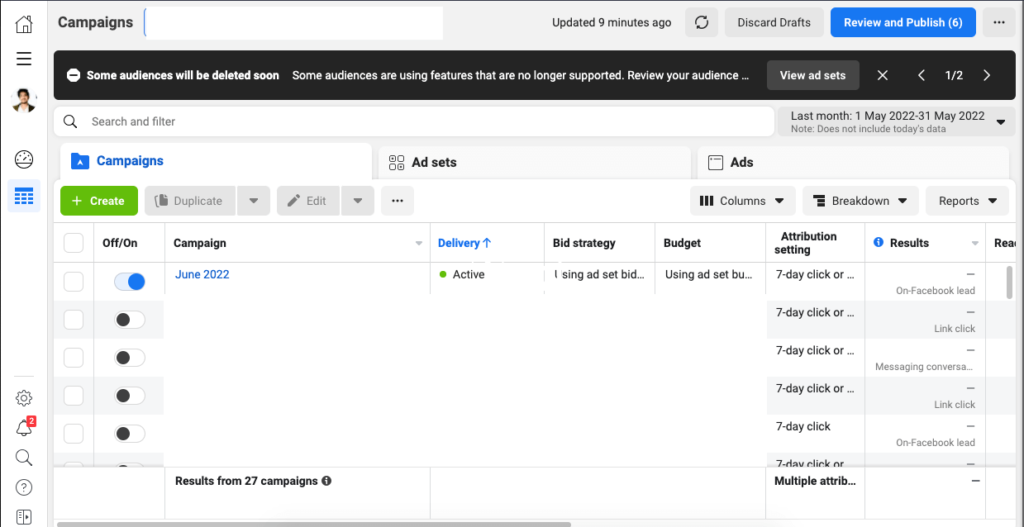
It will open Ads Manager in a separate window.
Campaign Management
Here you can manage your ads.
Ads Manager is your beginning point for running ads on Facebook & Instagram. It’s a fully-featured tool for creating and drafting ads, handling when and where they’ll run and monitoring how well your ad campaigns perform towards your business strategy.
With the right blogging tools in your bucket, You can generate more leads, build trust with your readers, and boost your search engine rankings. Tools are available to help you enhance your blogging efforts, from planning to search engine optimisation to marketing.
Here are a few that will make it easier for you to start and run your blog, so you’ll stick with it.
Grammarly, a free grammar checker, can speed up your blog writing process and help you avoid embarrassing mistakes.
You can directly start writing your blogs in the Grammarly editor or copy and paste them. Grammarly is also available as a Google Chrome browser extension, which will provide suggestions as you type in Google Docs, WordPress, Twitter, LinkedIn, and other sites.
Grammarly’s premium upgrade will check your spelling, grammar, and punctuation, suggest vocabulary improvements, and detect plagiarism.
An excellent tool for producing branded graphics and layouts is Canva.
Bloggers rely heavily on images, which you can find in everything from blog entries to social network posts. A good image on Pinterest can potentially become viral, bringing you thousands of visitors in a short period.
You may use the site to design graphics, edit photographs, and incorporate innovative typefaces into your designs.
Google Analytics is one of the best and most effective tools for tracking and analysing website traffic.
Google Analytics can help you figure out what works best on your site and where you should focus your efforts — for example, if your readers enjoy a specific type of content, you can make sure you write more of it.
The information you acquire from Google Analytics can help you understand who you’re attracting to your site, from demographics to information on the technology they’re using to access it.
Trello makes it incredibly simple to organise your ideas and monitor your progress. If you’re unfamiliar with Trello, it’s a project management tool comprised of boards containing lists, and you can create cards within those lists. This makes it ideal for constructing a blog editorial calendar.
You may create tasks, set due dates, add numerous team members, and do anything else you need to organise your entire blogging process.
MailChimp allows you to create email newsletters, share them on social media, integrate with other services, and track your progress.
As a blogger, MailChimp can have a significant impact on your online profile. The platform is highly user-friendly and efficient. It’s also a terrific approach to help bloggers who aren’t sure where to begin automating their growth.
The Google Keyword Planner is an essential tool for anyone who wants to stand out with their content, improve their SEO strategies, or increase the number of paid advertising on their page.
It is meant for researching keywords for your ad campaigns, but you can also use it to get more keyword insights for your blog articles.
It can help you create powerful keyword lists and get your blogs to rank higher on Google.
SEMRush is a keyword research tool that focuses on finding profitable keywords. We live in a time where proper search engine optimisation (SEO) is at the heart of a successful blog.
Semrush has the industry’s largest keyword database (over 20 billion keywords), so you can quickly acquire hundreds of keyword variations for your target keywords.
Semrush is free with limited features, or you can upgrade to one of the three significant plans: Pro, Guru, or Business.
SEMRush also offers a 14-day free trial that you may upgrade to a premium subscription if you find it to be a valuable tool for your blog.
If you plan to use HubSpot, you may start with a Freemium account for trial purposes and may upgrade to the Premium version when you want to get the benefits of the advanced version.
HubSpot is the perfect tool to maximize the effectiveness of your Inbound Marketing Strategy.
How Hubspot is Building Pathways for Businesses to Succeed
You’ve probably heard of HubSpot if you’re familiar with digital marketing.
HubSpot is popular because of its seamless integration of CRM, marketing web content, and sales. It is a very dependable and modern box that everyone in your team can learn to manage and drive in a safe and efficient manner. As a result, you’ll be able to grow more quickly.
Let’s learn more about HubSpot and how to use it effectively to achieve the most remarkable outcomes.
What is HubSpot?
To understand how HubSpot works, it’s helpful to know a little bit about HubSpot, the firm. Founded in 2006, They used to provide tools and information to help businesses get started with inbound marketing.
HubSpot tries to help businesses market more effectively.
After many years HubSpot launched a cloud-based marketing automation platform that can house all of a company’s digital marketing operations. Everything from the website hosting to blogging, SM posting, email marketing, etc.
As a result, every marketer in an organization can utilize HubSpot’s tools to nurture quality leads and streamline the sales funnel.
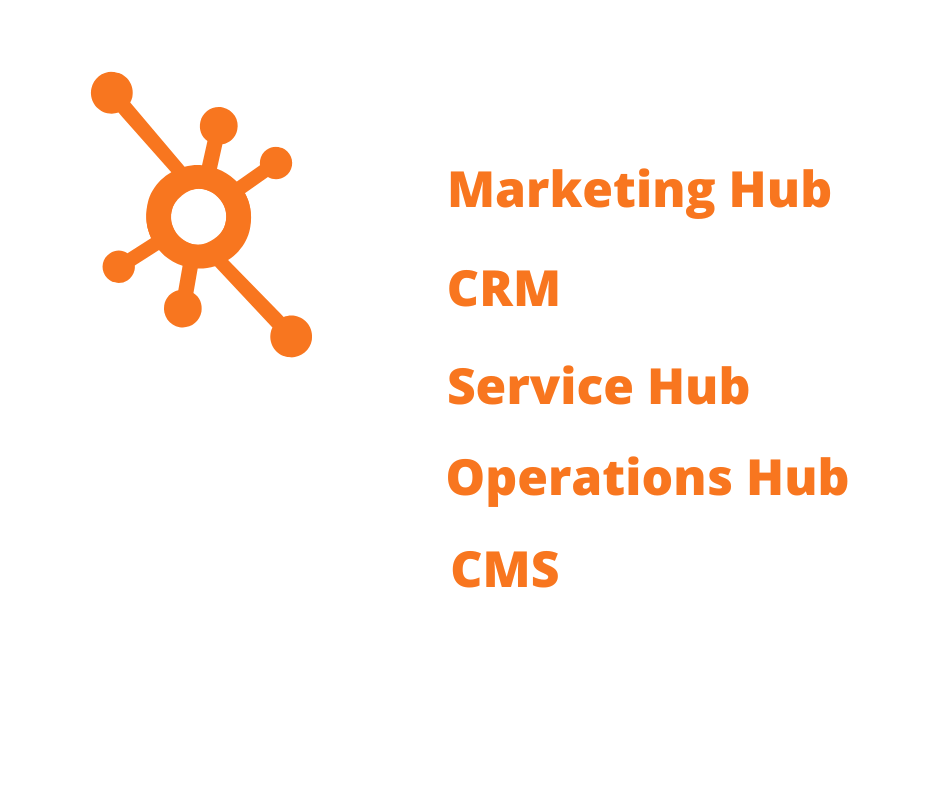
HubSpot software is loaded with practically every in-demand feature. Products of HubSpot are as follows.
HubSpot Products
Marketing Hub
HubSpot’s Marketing product can help you attract the relevant visitors, convert more visitors into sales, and conduct comprehensive inbound marketing campaigns at scale.
The good news is that HubSpot offers Marketing Hub in both the Freemium version and Premium version.
Freemium: Free email and forms
Premium: Premium marketing software for growing traffic and leads
Premium versions of all free tools, plus … Advanced CRM Sales automation eSignatures Predictive lead scoring Email sequences Smart send times Multiple deal pipelines Customizable reports Over 35 additional features
HubSpot CRM is a powerful sales software that enables businesses to close more sales, strengthen customer relationships, and streamline the sales pipeline. Few notable features of HubSpot CRM include pipeline management, automatic activity logs, live chat options, etc.
Freemium:
Premium: Premium versions of all features of Freemium, plus…
Email marketing Forms Contact management Landing pages Live chat Facebook, Instagram, Google, and LinkedIn ads Traffic and conversion analytics
Marketing automation SEO tools Video hosting & management Social media tools Blog & content creation tools Analytics dashboards Over 30 additional features
HubSpot’s Service Hub enables businesses to strengthen relationships with their customers, improve external and internal communication, and enhance team productivity.
Service Hub is easily integrated with HubSpot’s comprehensive CRM platform.
Freemium:
Premium: Premium versions of all features of Freemium, plus…
Ticketing Team email Live chat Email templates Email and chat to ticket Ticket creation bots Meeting scheduling Reporting
Customer service automation Knowledge base Customer feedback Multiple ticket pipelines Video creation Custom support form fields Goals Over 30 additional features
The Operations Hub platform allows you to conduct critical data management tasks as workflow activities. Whether you want to standardize time formats, capitalize names, or delete all-caps entries, the Ops Hub makes it simple.
Ops Hub is only available in the Premium version.
Premium:
Premium features Data sync Programmable automation Data quality automation Datasets Snowflake data share Workflow extensions Team management and permissions Expanded operational capacity
CMS Hub, aka content management system, allows you to create unique websites with excellent customer experience. CMS runs on the cloud and is an excellent alternative to WordPress.
Blog & content creation tools Dynamic content through HubDB SEO & content strategy Lead generation tools Smart content Live chat Security monitoring & threat detection Over 30 additional features
HubSpot’s CMS Hub
HubSpot A Way To Success
It has a free version that outperforms most paid CRMs on the market, and you can use it across your marketing, sales, and customer service departments. But this is not the only reason SMEs prefer HubSpot over other similar tools.
The struggle to meet customer expectations is nothing new for businesses; it has always existed. Because of customer expectations, business services are constantly praised and criticized; as a result, they fall short of customer satisfaction.
If you remember that customer problems are your problems and want to give them the best solutions, you’ll be fine. Then, in the end, you’ll meet the customer’s expectations.
And that’s the reason why you need HubSpot. It streamlines your processes and makes sure you record, track, and analyze customers’ Journeys.
When we talk about HubSpot CRM (Customer Relationship Management), we’re talking about the business’s beating heart. You must have the best CRM available because CRM aids in the development of healthy customer relationships, the management of prospects and customers’ information, and much more.
Source: Statista
CRM is one of the most rapidly growing software applications. In 2025, the CRM software market is expected to grow to 49.6 billion dollars. This represents a nearly four-billion-dollar increase from 2020, with a compound annual growth rate (CAGR) of 1.7 percent.
Source: Statista
HubSpot ensures that your customer interactions are smooth, effective, and efficient with a customer-centric strategy. You can compile customer data from various sources and save detailed information about customers, such as personal information, links to social media profiles, overall purchase history, previous interactions, behaviour patterns, etc.
Benefits of HubSpot
Boosts lead tracking and conversions
HubSpot provides various tools to help you optimize your lead generation, nurturing, tracking, and conversion. Using these tools, you may receive detailed insights into how visitors arrive on your site, what search engines they used, and what is the bounce rate. This is all precious information to ensure that your site is optimized.
Better and easy SEO
SEO is a riddle, challenging, and a slew of elements to consider to do it properly. HubSpot features many tools to help you manage keywords, boost your site’s rating, and create SEO-friendly content.
Integrated CRM
The integrated CRM in HubSpot improves customer journey by linking with your social media accounts and website, allowing you to track what visitors do on your site. It streamlines contact communication and the sales pipeline, boosting your revenue.
All in One
HubSpot greatly simplifies inbound marketing by bringing all of the tools you’ll need together in one location. HubSpot’s solution handles everything from Marketing to Sales and analytics.
Analytics
HubSpot makes it easy to collect all the data you need to build effective marketing strategies.
Final Thoughts
HubSpot is a Giant in inbound marketing software on the market. Like other software, it is not easy initially to adapt to new situations, but once you’ve mastered it, you’ll open up opportunities for your organization or business.
With the specific HubSpot CRM features and benefits, you can streamline your entire business process, speed it up, and scale it up with just one platform.
As a result, if you’re looking for a user-friendly, compatible, and accessible CRM, HubSpot CRM may be the best option available with such unique features and the Freemium option. HubSpot will undoubtedly assist you in achieving your business goals.
The logistics Industry in 2022 will be witnessing significant transformations owing to the fast-paced change in consumer habits and preferences. Businesses are investing in supply chain technologies more than ever as crises like the Covid-19 pandemic have exposed the gaps and pain points in the logistics industry that are yet to be addressed.
Have you read the headlines about the wastage of COVID-19 vaccination while transporting it from labs to vaccination centres?
Around 25% of vaccines were directly put into dustbins during the second pandemic, even before reaching doctors and patients.
The biggest challenge was the lack of cold chain logistics infrastructure to transport vaccines requiring 2-8 degrees Celsius. Hence, India observed an escalated demand for cold-chain logistics infrastructure.
Logistics Industry in 2022
The logistics industry in 2022 has become a complex, articulated and strategic structure: a critical success factor in the modern economy. The change has already begun, and the next ten years will open the door to a new era: the ability to adapt to the unique factors that dictate the game’s rules will establish winners and losers in the logistics industry in 2022.
Top Logistics Trends 2022that will Redefine The Logistics Industry
Last-Mile Delivery
Consumers today want quick delivery, and companies strive to develop new technologies that can help them resolve the last mile problem. Crowdsource technology is a crucial trend to watch out for as it facilitates on-demand deliveries. Retail giants like Amazon catering to customers with their lightning speed delivery have raised the bar for other companies.
Logistics companies that are lagging in terms of last-mile delivery are at the risk of losing their business to their tech-driven rivals. With consumers’ heavy reliance on online shopping and want for instant gratification, last-mile delivery is no longer a nice-to-have but a prerequisite to survive in this competitive market.
Drone deliveries are picking up in congested urban areas, and the global last-mile delivery market is expected to reach USD 200.42 Bn in 2027.
Automated Warehouse
The worldwide pandemic has pushed the mindset of replacing human labour with the latest technology. Nowadays, companies favour mobile robots, advanced data analytics, and computer vision solutions to reduce human involvement.
Warehouse automation is automating the transfer of inventory in or out of the warehouse to customers with less or no human involvement.
A French-based startup Exotecdeveloped an automated robot Skypod which optimized the warehouse with more floor space and vertical space by using a vertical storage method. It provides a wide range of advantages to companies like:
Better resource utilization.
A decline in labour and operational cost.
Better customer service
Increased data accuracy & efficiency.
Less shipping errors & inventory loss.
More warehouse spaces.
Moreover, robotics and artificial intelligence will play a vital role in automating the warehouse and logistics industry in 2022.
Packaging in Automated Warehouse with the help of Robotics.
3D printing
3D printing has captured the interest of everyone. 3D printing is already a major disruptive trend in some industries, and it will undoubtedly disrupt others.
It is likely to impact logistics and especially the design of supply chains. 3D printing is the process of making three dimensional solid objects from a digital file. Logistics providers should embrace this change and anticipate the implications of 3D printing on global supply chain dynamics.
Accenture believes that digital supply networks are the backbone of this new ecosystem: worldwide conduits that streamline and accelerate the exchange of products, materials, components and (perhaps most important) information.
3D printing will offer opportunities for mass customization and decentralized production.
Presently, the value of the transferred production is approximately 4,000 billion Euros. The impact forecast by the new technologies (3d printing, but IoT as well) will reduce between 2.3% and 3.9% in 2025. Fewer products will be shipped far away, but “last mile” shipping could increase.
Prototype of a 3D print
Drone Delivery
As you read this, drone deliveries are being tested in Canada and India. It is soon going to be the new trend that changes the industry forever. It is a great way to avoid traffic, and with more experiments, they will be able to avoid weather issues globally. At some point, companies will use drones to track packages, monitor and search, locate assets and employees. As a result of these trends, more logistic companies are ready to embrace the change and use insurance to provide a safety net.
Drone helping in delivery of goods.
Autonomous vehicles
Tech enthusiasts have been talking about the future promise of autonomous vehicles for many years, but these robotic transportation systems are already here in many ways. Independent trucks are already beginning to run under “supervised autonomy,” and it’s only a matter of time before that supervision becomes unnecessary. If they are appropriately designed and tested, autonomous vehicles have the potential to be safer, less expensive, and easier to manage than manually driven vehicles. That makes operating expenses lower, keeps the roads safer, and allows vehicle operators to find new, higher-level positions in their respective companies.
Blockchain
A blockchain is a digital ledger of duplicated transactions distributed across the entire network of computer systems on the blockchain. In simple terms, all-digital ledgers are a series of encrypted “blocks” interlinked in a public chain. There is no trust issue if you buy a product in your area and a deal is made face-to-face. However, in interstate or global trade, the risk of forged and misleading documents exists.
It builds a trustworthy environment for users by assuring 100% forgery and modification of free data, documents and transactions. The Blockchain in Transport Alliance (BiTA) has around 85% of truck-based transactions globally. Blockchain helps customers and suppliers track the visibility of the order. It increases efficiency and effectiveness by observing vehicle performance history.
Green vehicles
With rising concerns about carbon emissions owing to increased demand for the logistics industry in 2022 on account of expanding eCommerce, there is a shift towards greener transportation alternatives. The global electric truck market is projected to reach $1,893.1 million by 2027, and this growth can be partly attributed to the logistics industry in 2022 replacing their fleet with greener vehicles. Not just trucks, electric two-wheelers, three-wheelers, and light commercial vehicles are also in demand. Adopting such sustainable practices provides remarkable benefits such as lots of torque, low levels of pollution, and reduced maintenance costs.
Cloud computing
The Cloud is used in virtually every aspect of modern life, including banking, email, media streaming, and eCommerce. Microsoft defined cloud computing as the delivery of computing services- servers, storage, databases, networking, software, analytics, and the internet (the Cloud).
Example of cloud computing
Cloud computing is benefitting the logistics industry in 2022. In the logistic sector, daily interaction between stakeholders is necessary. Cloud computing enables the cost-effective connection of many partners throughout the supply chain. Besides this, the cloud-based SaaS solutions have the following advantage for logistics industry in 2022:
Collects data from customers, retailers and wholesalers to comprehend the supply & demand gap.
Easy to learn and has high adoption rates.
Reduces the stress and cost of additional software with upgrading capabilities.
The offered initial cost is also low.
The business escalates to acquire a more extensive customer base.
One of Silicon Valley’s most renowned startup accelerators, Y Combinator warns of economic downturn to founders of its portfolio companies to “plan for the worst,” warning they face a rough ride ahead as the economy declines and funding becomes more challenging obtain.
Y Combinator, an American technology startup accelerator, launched in March 2005. It has been used to launch more than 3,000 companies, including Stripe, Airbnb, Cruise, PagerDuty, and Reddit. The combined valuation of the top YC companies was more than $300 billion by January 2021. The company’s accelerator program started in Boston, and Mountain View expanded to San Francisco in 2019 and has been entirely online since the COVID-19 pandemic. Forbes characterized the company in 2012 as one of the most successful startup accelerators in Silicon Valley. This company has a great name in the industry and must have a very skilled team. Their statement holds ideal weight.
“No one can predict how bad the economy will get, but things don’t look good,”
YC wrote in a letter sent to its portfolio founders this week titled “Economic Downturn.”
“The safe move is to plan for the worst,”
Y Combinator Warns of Economic Downturn
Y Combinator warns of economic downturn to startups comes a week after one of the most prominent venture capitalists in the technology business, SoftBank Group Corp., announced it would start being “more selective” in its investments. That followed a loss of $27.7 billion from investments made by its Vision Fund in the just-ended fiscal year.
Earlier this year, reports emerged that large crossover firms such as Tiger Global and D1 Capital also were pulling back on late-stage investments.
The venture market has already shown some softness, falling quarter to quarter for the first time in Q1 2022.
SoftBank Group Corp. announced it would start being “more selective” in its investments. That followed a loss of $27.7 billion from investments made by its Vision Fund in the just-ended fiscal year.
Y Combinator Talks about Market Slowdown
The slowdown in the market is undoubtedly a reflection of the beating many public tech stocks, including Netflix and Meta, have taken in the general market. Such drops can make it harder for VCs to raise money from LPs and lead some large growth firms to deploy their capital in the public market instead of the private in search of bargains.
Added to the falling market are the ongoing issues with inflation, interest rates and geopolitical unease that have made Ventrue dollars harder to come by.
Y Combinator warns of an economic downturn, as most likely will resound in the startup community. The firm invests in hundreds of companies a year, and its portfolio is a who’s who of startup success stories such as Airbnb and Stripe.
While admitting no one can predict the future, the letter paints a bleak year ahead as a warning to the whole industry. It warns founders that.
“it’s your responsibility to ensure your company will survive if you cannot raise money for the next 24 months.”
Companies retaliate against Y Combinator’s Statements.
Constellation Research Inc.’s Holger Mueller said Y Combinator warns of an economic downturn, indicating that both investors and startups alike have to adjust their spending plans amid a contracting economy that’s likely to worsen before it recovers.
“With many software startups working virtually due to COVID, the only place where they can achieve substantial savings is on personnel costs,” Mueller said. “In line with typical downturn cost-cutting patterns, we can expect to see marketing spend at many startups slow down, with salespeople being laid off, services being given to partners, and reductions in R&D spend. It may not be all bad news, though, because if startup founders are forced to make smarter decisions around their spending, they will be well set to come out of recession in stronger shape.”
The Final Word
Y Combinator added a final word of caution for those founders who, despite all the warning signs, may feel that it’s being overly dramatic.
“If, for whatever reason, you don’t think this message applies to your company or you are going to need someone to tell you this in person to believe it, please reassess your beliefs monthly to make sure you don’t drive your company off a cliff,” it stated.
Markets have tightened considerably in 2022. Y Combinator warns of the economic downturn in its note,
“If you don’t have the runway to reach ‘default alive’ and your existing investors or new investors are willing to give you more money right now (even on the same terms as your last round), you should strongly consider taking it.”
Google Analytics is one of the most valuable products that Google provides. Businesses use Google Analytics to receive real-time website analytics and reporting to make better business decisions based on the data.
As they say,
“With a large amount of data comes a large amount of responsibility.”
Taking one step further in Google Analytics, Google introduced the Google Analytics Heat map.
What is Google Analytics Heat Map?
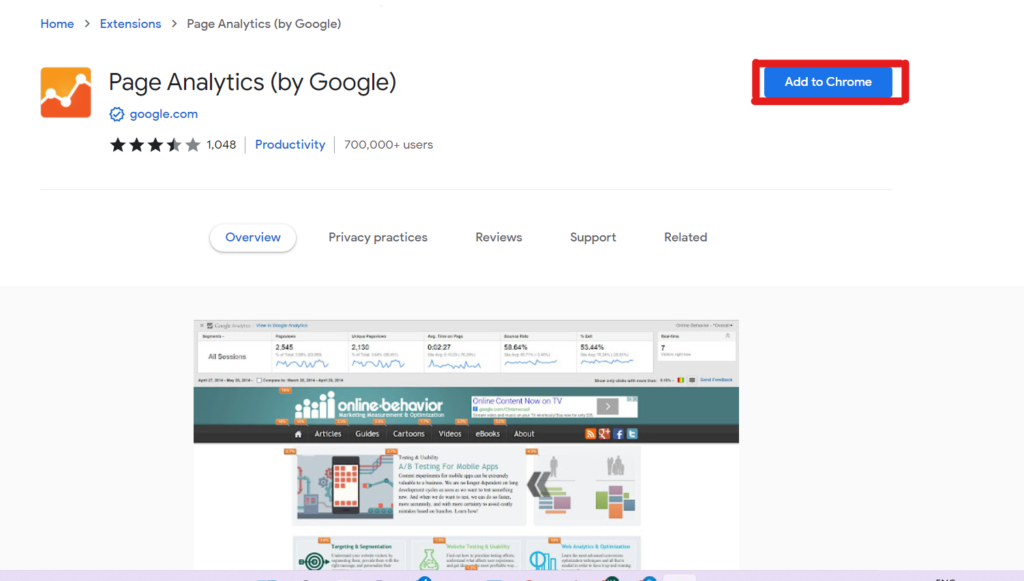
Google has just developed a Chrome addon called Page Analytics that allows you to construct a Heatmap using Google Analytics data.
Heat maps are graphical representations of particular metric values. A heat map is a visual representation of the data on your website, and it displays you where people click on your web pages once it’s installed.
Critical advantages of Google’s heat map extension
Overview of website performance.
Visual Representation of data for better understanding.
It works backward and leverages data from your Google Analytics account.
It works on any page with the GA tracking code installed and does not impose any restrictions on page views.
Using real-time traffic, you can segment visitors and view heat maps.
See how visitors interact with your website. If you want an engaged audience and a more significant discussion rate, you must understand your users’ behavior and leverage it.
How Does Heat Map Work?
The Google Analytics heat map is simple to create and use.
The first step is to create a Google Analytics account (skip this step if you already have a Google Analytics account) and configure your website with the code provided by Google Analytics for each web page you want to track.
Download page analytics extension. Once you have a click map for each website page in your browser, you’re ready to examine your website.
After that, you’ll notice an icon at the bottom of the screen. Please turn it on.
Login to your Google Analytics account and Link Page Analytics.
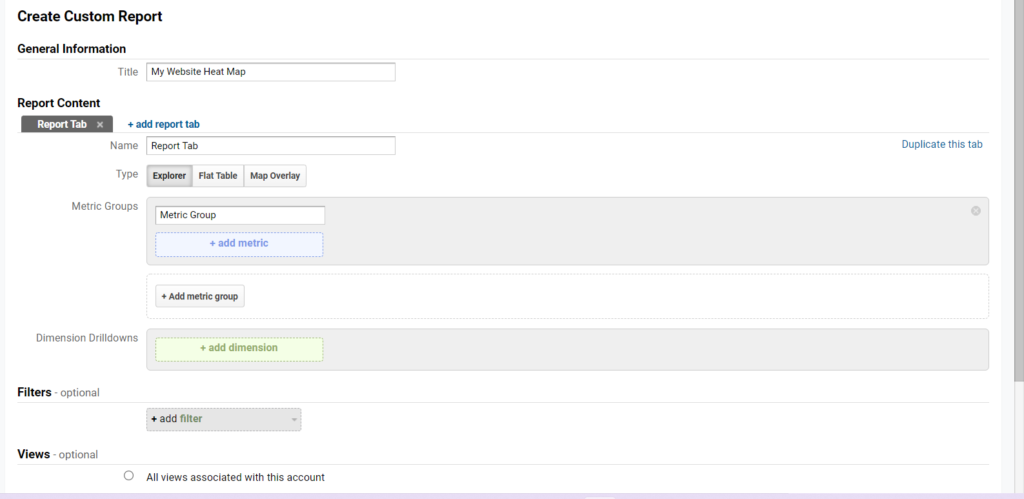
In the custom menu on the right side of your website, select Customization. Then, under New Report, type in a title for your report, such as Heatmap.
In the dimensions section, enter the metrics you wish to track and the days of the week and hours.
You can also select a specific optional section of data that you wish to keep an eye on.
After completing this, you can view your report and select the date range from the upper right side.
You can now specify the period that your heat map should cover. If you only have a little information, use a date range that covers a lot of ground.
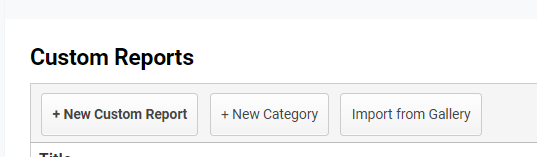
Custom Report
Create a Report
Enter Report Details
Conclusion
The Google analytics heat map allows you to analyze your site data and provides you with in-depth insights into the viewers, allowing you to improve strategies to attract your target viewers.
If you operate a company and wonder how to create a business email, you’ve come to the correct place.
Numerous websites allow you to create a business email quickly; Earthlink is one of them.
How to create a Business Email with Earthlink
Earthlink subscribers can create up to 8 distinct email accounts by default.
Each email account comes with 100MB of storage and may be accessed from any computer by going to Earthlink’s website.
Spam and virus protection and an online address book to access contacts are also included.
Use the My Account tab to create a new email account for a business partner, family member, or personal use.
Earthlink Website
Steps to Create a Business Email
Sign in to your account on the Earthlink website’s My Account page (see Resources). Fill in the boxes with your email address or Earthlink ID and password. “Sign In” will appear.
Click “Add a new email profile in the Email Profiles section.”
To create a new email account, fill in all the information asked on the signup screen. For the performance, choose a username and password.
Confirm the email account’s creation by clicking “Add Email Profile.”